

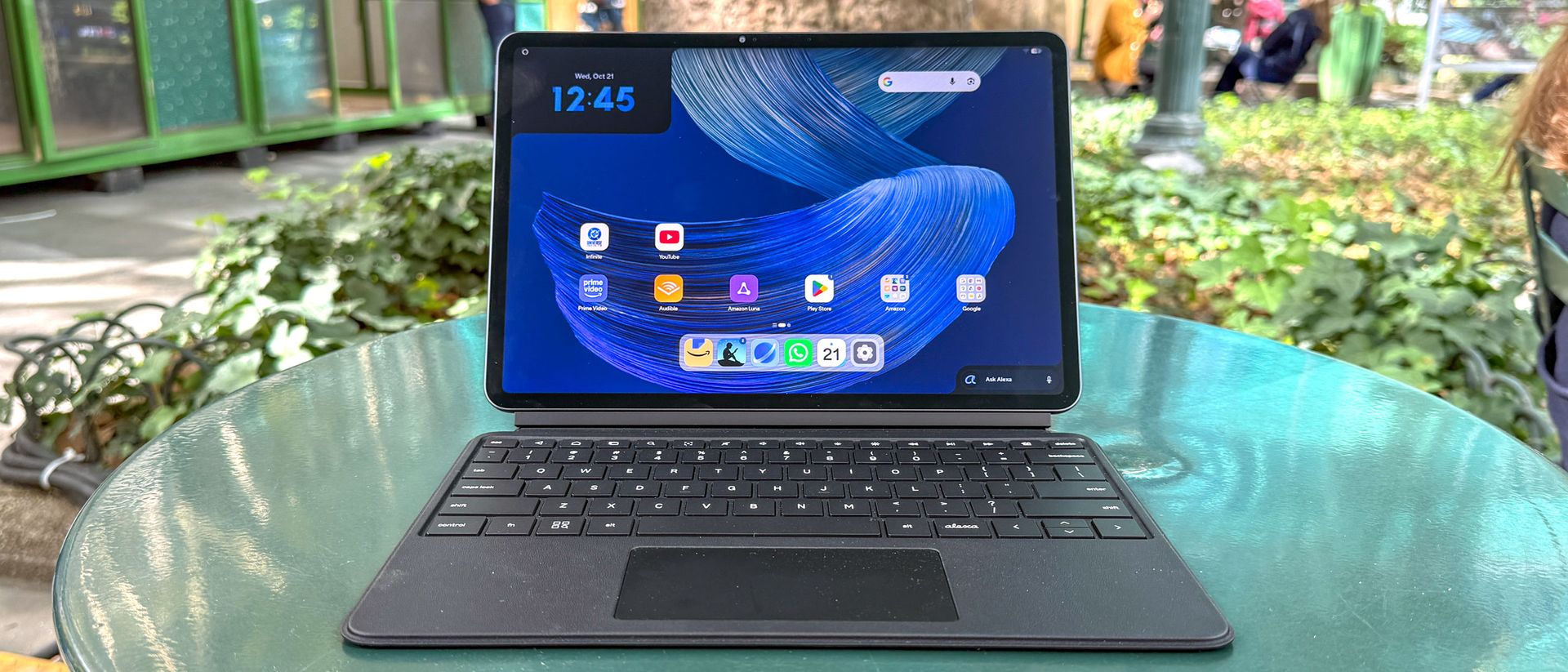
Amazon’s Alexa Tablet 12 Pro ($499 to start) is an Android tablet that completely surprised me. As the flagship of the new Alexa tablet line, which effectively replaces Amazon Fire tablets, this slate runs on Android and is built to work seamlessly with Alexa+. While that integration is certainly a selling point, I’m truly impressed by the hardware that elevates this Android tablet above its peers and even puts it on par with the best iPads.
The sturdy aluminum unibody is great in hand, making it feel like a premium device. It’s also thin and light enough to hold comfortably for extended periods. My favorite feature is the 12-inch 2.8K display. Though it’s not an OLED, everything you see looks bright and colorful. The optional Nanomatte anti-glare option is also a huge game-changer.
This Alexa tablet runs full-blown Android, bringing Google Play services to an Amazon tablet for the first time. It also serves as an excellent replacement for the best Kindles. This helps make the Alexa tablet feel like an extension of the Amazon ecosystem, though that part might not matter much if you don’t already own Alexa devices or a Kindle.
After using the Amazon Alexa Tablet 12 Pro as my daily driver for watching videos and reading for the better part of a week, I can comfortably say it’s one of the best Android tablets and best tablets right now. Sure, it’s not for everyone, but if you’re an Alexa user or want a slate with an anti-glare screen, you won’t go wrong here. Find out more in my full review.
Amazon Alexa Tablet 12 Pro review: Cheat sheet
- What is it? As its name suggests, the Amazon Alexa Tablet 12 Pro is a slate built to work with the Alexa ecosystem. Beyond that, it’s an Android tablet that arguably rivals Apple’s entry-level iPad.
- Who is it for? This device is for folks who want a tablet that can control their Alexa devices or an Android slate with an anti-glare display.
- What does it cost? The Amazon Alexa Tablet 12 Pro starts at $499 for a model with 8GB of RAM and 128GB of storage. For $150 more, you can add a Nanomatte display. The most expensive stand-alone model with 256GB of storage and a Nanomatte display costs $679. A productivity bundle that includes the Alexa Pro Keyboard and Alexa Pro Pen is also on sale for $799.
- What do we like? We like the sleek design, lovely display, Alexa+ integration, smooth performance, and long-lasting battery life.
- What don’t we like? We don’t like the high cost of upgrading storage and moving to the Nanomatte model. The peripherals can also get quite pricey.
Amazon Alexa Tablet 12 Pro review: Specs
|
Amazon Alexa Tablet 12 Pro (starting) |
Amazon Alexa Tablet 12 Pro (tested) |
|
|
12-inch | 2800 x 1840 | 120Hz | 3:2 aspect ratio |
||
|
8MP front camera | 13MP rear camera (both w 1080p video) |
||
Amazon Alexa Tablet 12 Pro review: The ups
The Alexa Tablet 12 Pro has a lot to offer, thanks to its superb display, sleek design, long battery life, and smart Alexa integration.
Sleek design
Amazon didn’t reinvent the wheel of tablet design, as the Alexa Tablet has the basic form of modern-day slates. That said, it’s a beautiful aluminum slab with a slim profile and elegant curves. The all-black chassis also gives the tablet an air of sophistication.
The design is decidedly minimalist. In landscape, the power button sits on the top-left edge, while the volume buttons sit on the top-left corner. The 8MP front camera lies right in the center, along the thin bezel. On the back, you’ll find the 13MP rear camera and the Alexa logo. Like most modern tablets, it has a single USB-C port on the right side, or bottom if you’re holding the tablet in portrait mode.
Speakers flank the left and right sides, and they’re pretty good for tablet audio. Dialogue-heavy podcasts and videos sound great, with clear, distinct voices. The speakers also do a good job with movies and TV shows that feature a wide range of audio. And while music can lack bass, it’s still plenty punchy and clear.
Vivid display
The 12-inch display on the Alexa Tablet 12 Pro is a wonder to behold. Everything appears crystal clear, thanks to the sharp 2800 x 1840 resolution that brings out even the smallest details. While this isn’t an OLED, it still delivers excellent contrast between dark and light elements. Colors are vivid, and the overall brightness never overwhelms.
I watched a lot of YouTube videos during my testing, and I loved how the matte display diffused the lighting in my living area. Whether it’s bright and bold animated series like Invincible or gritty action shows like Reacher, everything looks fantastic. I also appreciate how the matte display on this tablet doesn’t soften color nearly as much as I’ve seen on other devices utilizing similar tech.
How did the Alexa Tablet 12 Pro do in our display benchmarks? As you can see above, color reproduction (sRGB and DCI-P3) isn’t oversaturated, and color accuracy (Delta-E) matches other tablets and laptops we’ve tested.
The numbers line up with my experience, as I found the hues generally looked natural. HDR brightness doesn’t get as high as on other devices, but to my eyes, the brightness was just perfect. Numbers-wise, the Alexa Tablet 12 Pro is comparable to the Apple iPad 11.
The display on my review unit has a slightly rough texture that mimics paper, which is great for reading. Speaking of reading, comic books look gorgeous because the matte display slightly mutes colors, creating a more paper-like appearance. If you’re into reading digital comics like I am, this is arguably the best tablet for reading your favorite funnies.
Strong performance
The Alexa Tablet 12 Pro delivers solid performance for an Android tablet, thanks to its mid-range MediaTek Dimensity 8400 processor and 8GB of RAM. While this isn’t a workhorse tablet, it generally performs well for web browsing and video streaming. However, I noticed that performance slowed when I opened up multiple Chrome tabs and other apps.
|
Geekbench 6 (single-core / multi-core) |
||
|
3DMark Wild Life Extreme Unlimited (score/fps) |
On the Geekbench 6 CPU test, Amazon’s new tablet scored similarly to the Apple iPad 11 in both single- and multi-core performance. These results match my experience: throwing too much at Amazon’s slate makes it struggle.
You can certainly use this tablet for productivity, especially with its optional peripherals, but it won’t replace a traditional laptop. However, if you’re using Amazon’s slate mainly for entertainment and light work in Google Docs, its performance won’t disappoint.
Long battery life
The Alexa Tablet 12 Pro delivers excellent battery life. In our battery life test, which involves continuous web surfing over Wi-Fi with the display set to 150 nits of brightness, the tablet endured for an astonishing 13 hours and 17 minutes! As you can see below, that’s almost two hours longer than the iPad 11.
During a stay-at-home weekend, when I sporadically watched YouTube videos and read comics and novels with the display at 70% brightness, the tablet generally dropped from 80% battery to the low 40s over 16 hours.
On weeknights when I’m only home in the evening, the battery drops by about 10% over four hours of use. This is more than enough for all-day usage!
Seamless Amazon ecosystem integration
The Alexa Tablet 12 Pro works great as a standalone slate, but it really shines as a hub for your Amazon devices and apps. As Amazon says, the tablet has the intelligence of Alexa+ and has built-in access to Google Play Store apps. And naturally, the tablet also works well as a Kindle.
I own an Amazon Echo Dot and have two smart lights that support Alexa. When I was winding down for the night, I could dim the lights right on the tablet instead of pulling out my phone to open the Alexa app. And if I wanted to fire up a song on my Echo Dot, I either typed or vocalized the request to the tablet. All of this was relatively seamless. If you don’t care to chat with Alexa, you can go into settings to swap to Google or Bing’s respective voice assistants.
I’m a fan of Kindles, so I loved using this tablet as another Kindle device. When you open the Kindle app, a fun wave-like animation washes across the screen. This isn’t just for show, as the tablet instantly lowers blue light and disables notifications to replicate the Kindle reading experience. This also helps extend battery life. I also like that it has three visual modes: full color, muted colors like on a Kindle Colorsoft, or full black and white.
If you own a lot of Alexa-supported devices, this Alexa tablet does a nice job of letting you control them all. It serves that purpose well, but it might not be a feature for everyone, which leads us into the next section…
Sharp cameras
If you want to look your best on video calls or snap some photos, the tablet’s front and rear cameras are up to the task. The front 8MP camera captures details of my face, clothing, and background, as you can see above.
Then there’s the 13MP back camera, which also captures details nicely. While I wouldn’t personally use a tablet to take selfies or capture video, I’m impressed by the strong resolution both cameras deliver.
Amazon Alexa Tablet 12 Pro review: The downs
While the Amazon Alexa Tablet 12 Pro is a great Android tablet, it has its drawbacks.
For Amazon users only
This is a very Alexa-centric tablet. That’s clear the moment you see the home screen, where you’ll find an assortment of Amazon apps like Prime Video, Audible, Kindle, the Silk browser… and even Luna!
And since it runs on Android, you can also quickly access a slew of Google apps. If that wasn’t enough, UI elements like an Alexa+ widget in the bottom-right corner also remind you that this is an Alexa device.
All of this can be extremely handy for folks who often utilize Amazon and Google apps. I use many of the latter and several of the former, and it’s nice being able to access those apps quickly. However, if you’re not invested in the Amazon ecosystem, they might as well be bloatware, especially if you just want a no-frills Android tablet.
Speaking of Android, it’s still not nearly as snappy and consistent as iPadOS. There is always a slight bit of delay when scrolling through pages on sites and apps. I also had some apps take forever to load or completely crash unexpectedly. Those instances aren’t frequent, but they happen far more often than they do on an iPad.
Expensive peripherals
To get even more use from the Alexa Tablet 12 Pro, you can purchase the Alexa Pro Keyboard and Alexa Pro Pen.
The Pro Keyboard isn’t just for typing; it also doubles as a protective case for the tablet. This peripheral has a leather-like texture that feels good against your fingers and palms. The membrane keys are better than you’d expect for a tablet keyboard, with nice travel distance and even spacing. I don’t have problems typing on this keyboard, even with my big hands. I also like the dedicated Alexa button beside the arrow keys that instantly brings up the AI assistant.
The Pro Pen is a pretty great stylus, having a similar weight and feel to an Apple Pencil Pro. Thanks to the tablet’s matte texture, writing with the stylus (almost) feels like writing on paper. Writing notes in the margins of a Kindle book is almost identical to doing the same action on a Kindle Scribe — which makes sense given how they’re both Amazon devices.
While I think the Pro Keyboard and Pro Pen are excellent peripherals, they’re both pretty expensive — the former costs $149 and the latter $89. There’s currently a $799 bundle that saves you $120, but that’s still a steep price to pay on top of the tablet.
Amazon Alexa Tablet 12 Pro review: Verdict
I enjoyed my time with the Amazon Alexa Tablet 12 Pro, as it’s a far better slate than I expected. Sure, Android can be somewhat sluggish, and I’ve rarely (if ever) needed to interact with Alexa+, but the excellent hardware ultimately won me over. The design is perfect, and the Nanomatte display makes for a wonderful viewing and reading experience. I also love how this tablet doubles as a Kindle.
Serious Alexa or Google users will find a lot to like about the Alexa Tablet 12 Pro. If you don’t fall into that category, the iPad 11 offers a more responsive, stable operating system and has almost all the apps and services on the Alexa Tablet 12 Pro. But if you liked what I had to say about this slate, then you should consider checking it out. You might end up loving it as much as I have!
