Close Menu
MyAppsPlus

    Subscribe to Updates

    Get the latest creative news from FooBar about art, design and business.

    What's Hot

    ‘Nobody Wants This’ season 3 review: Did someone accidentally hit the romance fast-forward button?

    October 22, 2026

    Blink debuts first-time 4K, spotlight, pan-tilt cameras + expands outdoor XR series

    October 22, 2026

    Xbox is previewing paid cloud gaming for players without Game Pass

    October 22, 2026
    Facebook X (Twitter) Instagram
    Facebook X (Twitter) Instagram
    MyAppsPlusMyAppsPlus
    Thursday, October 22
    • Home
    • Breaking Tech
    • Apps & Software
    • AI & Automation
    • Android
    • iPhone & iOS
    • More
      • Reviews
      • How-To Guides
      • Deals & Discounts
      • Shop
    MyAppsPlus
    Home»Reviews»I finally pressed the one Roku button I always ignored, and I’m kicking myself
    Reviews

    I finally pressed the one Roku button I always ignored, and I’m kicking myself

    myappsplusBy myappsplusOctober 22, 2026003 Mins Read
    Share Facebook Twitter Pinterest Copy Link LinkedIn Tumblr Email Telegram WhatsApp
    Follow Us
    Google News Flipboard
    I finally pressed the one Roku button I always ignored, and I’m kicking myself
    Share
    Facebook Twitter LinkedIn Pinterest Email Copy Link

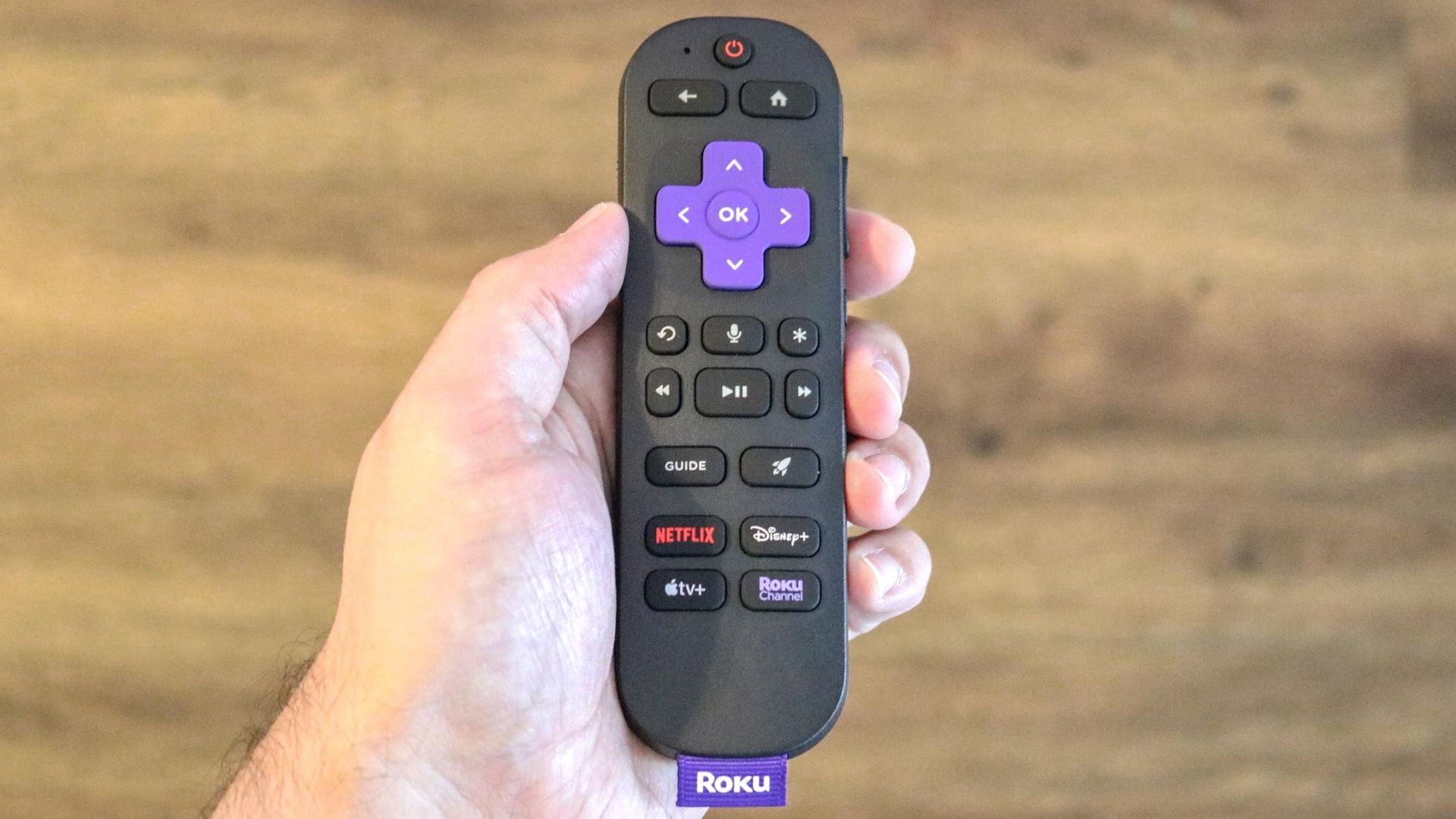
    For millions of households, the Roku remote is a fixture on the coffee table. But most of us stick to the directional pad, volume, and app shortcut buttons without paying much attention to the rest.

    The star button is easy to overlook, but it opens an options menu that changes depending on what you’re doing. Press it during a show and you can adjust captions and sound settings, press it on the home screen and you can manage your apps.

    If you want to get more out of your Roku player or Roku TV, here are a few ways you can put the star button to use.

    1. Volume Leveling and Night Mode during playback

    (Image: © Tom’s Guide)

    One of the more useful things the star button does happens during playback. Press it while a movie or show is playing, and on most Roku devices an Options menu appears on screen. Among the settings there, you’ll find volume modes such asLeveling and Night.

    Leveling keeps volume more consistent as you move between apps or when a commercial comes on, so you don’t have to keep adjusting it. Night Mode raises quieter sounds like dialogue and lowers louder ones like explosions, which helps for late-night viewing when you don’t want to disturb anyone. Once you pick a mode, it stays on when you return to that app.

    Availability varies by device, and in some apps the star button does something else, so you may not see these options everywhere.

    2. Quick caption controls

    (Image: © Tom’s Guide)

    The star button is also a quick way to manage closed captions without leaving what you’re watching. While something is playing, press it to open the Options menu, where you can turn captions on or off, and set them to “On mute” or “On replay.”

    That replay setting briefly shows captions after you press the instant replay button, so you can catch a line you missed without keeping subtitles on the whole time. Because some apps use their own caption controls, this option may not appear in every app.

    3. App management and cleanup

    (Image: © Henry T. Casey / Tom’s Guide)

    The star button works on the home screen, too. Highlight any app and press it to open a menu for that app, where you can move it to a new spot, check for updates, or, for subscriptions billed through Roku, manage your subscription.

    It’s also the easiest way to clear out apps you don’t use. Select “Remove app”to uninstall it, which frees up space on your device. If an app keeps crashing, removing it, restarting your Roku, and adding it back is a common fix.

    Do you have any Roku tips or tricks? Share them in the comments below!

    • Can’t find your Roku remote? You’ll never lose it again after you learn this simple trick
    • Don’t replace your slow Roku yet — try this 10-second fix first
    • 5 Roku tips to instantly improve your TV experience
    Entertainment finally pressed Streaming Streaming Devices
    Follow on Google News Follow on Flipboard
    Share. Facebook Twitter Pinterest LinkedIn Tumblr Email Copy Link
    myappsplus
    • Website

    Related Posts

    ‘Nobody Wants This’ season 3 review: Did someone accidentally hit the romance fast-forward button?

    October 22, 2026

    How to unlock Apple’s new dynamic Readiness Score on your Apple Watch

    October 22, 2026

    How to watch The Flores Massacre online: stream the true crime docuseries from anywhere

    October 22, 2026
    Add A Comment
    Leave A Reply Cancel Reply

    Top Posts

    Cathay Pacific tests Google AI that dramatically cuts airplane contrails — tiny altitude shifts slash environmental impact by 40% in early trials

    September 8, 2026137 Views

    Drone swarm tech valued by both defense and civilian sectors, industry platform says

    September 8, 202614 Views

    Best Gaming TV 2026: High refresh rates and stunning visuals

    September 8, 202614 Views
    Latest Reviews

    The 2026 list of malicious Android and iPhone apps

    myappsplusAugust 31, 2026

    Polymarket reportedly raises $300 million from Donald Trump Jr.’s investment fund

    myappsplusAugust 31, 2026

    Today I learned that F-35 pilots get $400,000 helmets with ‘X-ray vision’ – but the Pentagon almost ditched them

    myappsplusSeptember 1, 2026
    Stay In Touch
    • Facebook
    • YouTube
    • TikTok
    • WhatsApp
    • Twitter
    • Instagram

    Subscribe to Updates

    Get the latest tech news from FooBar about tech, design and biz.

    Most Popular

    The 2026 list of malicious Android and iPhone apps

    August 31, 20260 Views

    Polymarket reportedly raises $300 million from Donald Trump Jr.’s investment fund

    August 31, 20260 Views

    Google TV Streamer gets $50 price increase 

    September 1, 20260 Views
    Our Picks

    ‘Nobody Wants This’ season 3 review: Did someone accidentally hit the romance fast-forward button?

    October 22, 2026

    Blink debuts first-time 4K, spotlight, pan-tilt cameras + expands outdoor XR series

    October 22, 2026

    Xbox is previewing paid cloud gaming for players without Game Pass

    October 22, 2026

    Subscribe to Updates

    Subscribe to our newsletter and get the latest tech news, app updates, AI trends, smartphone reviews, and exclusive deals delivered straight to your inbox.

    Facebook X (Twitter) Instagram Pinterest
    • About Us
    • Get In Touch
    • Disclaimer
    • Privacy Policy
    • Terms & Conditions
    © 2026 MyAppsPlus. All Rights Reserved.

    Type above and press Enter to search. Press Esc to cancel.