Close Menu
MyAppsPlus

    Subscribe to Updates

    Get the latest creative news from FooBar about art, design and business.

    What's Hot

    BioWare is closing, and the next Mass Effect is going with it

    October 22, 2026

    GridCraft is the open-source Excel clone for Linux I’ve been waiting for

    October 22, 2026

    Create illustrated, print-ready books with this $40 AI lifetime subscription ($499 value)

    October 22, 2026
    Facebook X (Twitter) Instagram
    Facebook X (Twitter) Instagram
    MyAppsPlusMyAppsPlus
    Thursday, October 22
    • Home
    • Breaking Tech
    • Apps & Software
    • AI & Automation
    • Android
    • iPhone & iOS
    • More
      • Reviews
      • How-To Guides
      • Deals & Discounts
      • Shop
    MyAppsPlus
    Home»iPhone & iOS»How to turn on the new Sound Glow feature on HomePod
    iPhone & iOS

    How to turn on the new Sound Glow feature on HomePod

    myappsplusBy myappsplusOctober 22, 2026003 Mins Read
    Share Facebook Twitter Pinterest Copy Link LinkedIn Tumblr Email Telegram WhatsApp
    Follow Us
    Google News Flipboard
    How to turn on the new Sound Glow feature on HomePod
    Share
    Facebook Twitter LinkedIn Pinterest Email Copy Link

    In this brief tutorial, we tell you about the new Sound Glow feature added to HomePod and HomePod mini running software version 27.2.

    Have you used the Visualizer in the Apple Music app on Mac, or Sync Lights with Music in a Tesla Model Y Premium? Both turn sound into light, with colors and glowing patterns that move with the music on your Mac screen or across the Tesla car’s interior accent light strip.

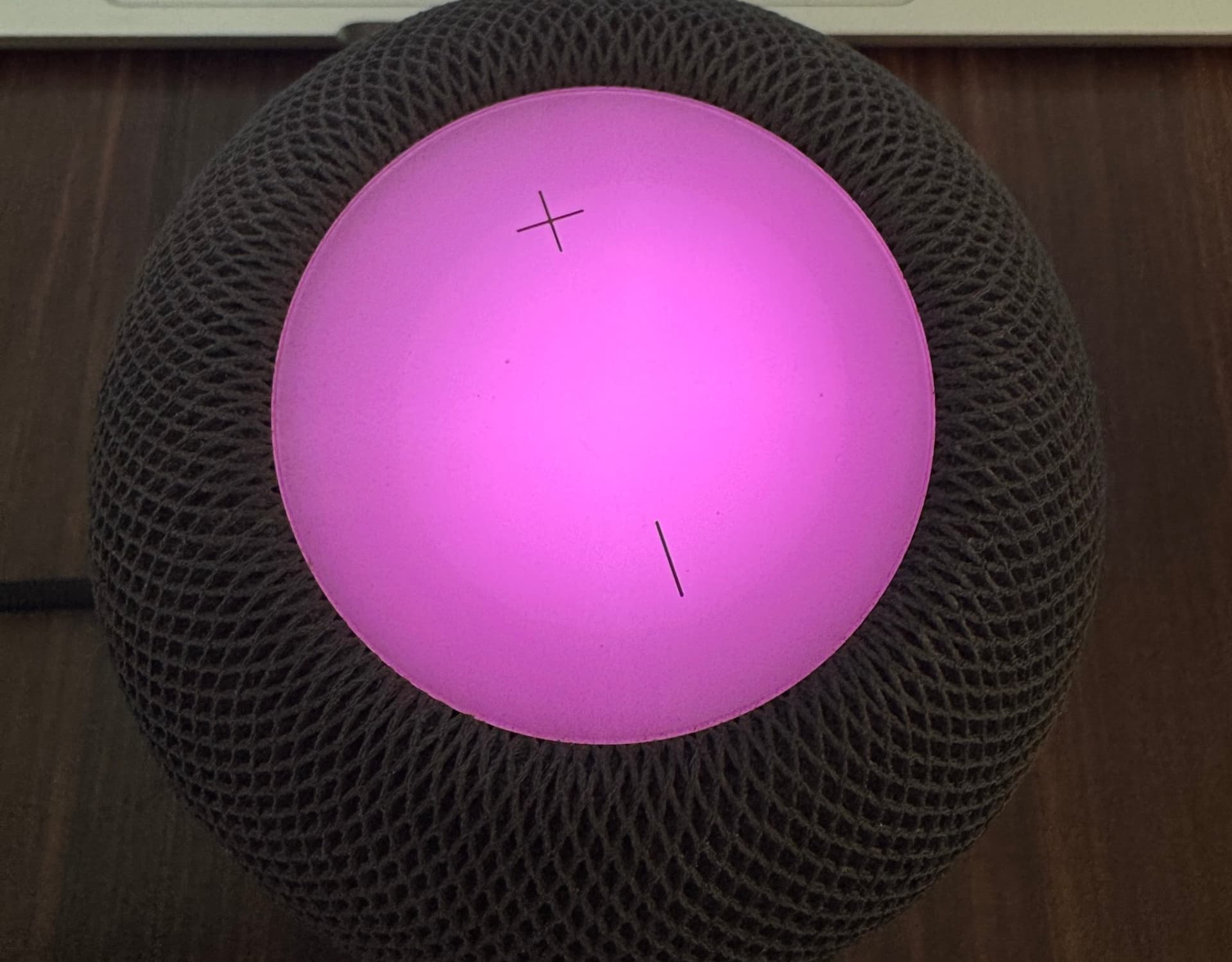
    Along the same lines, HomePod software version 27.2 adds a new party trick that lets you watch your music come to life by turning the top circular display into glowing/pulsing lights that dance to the album art color (usually) and the rhythm of your currently playing music, podcast, or video. It usually shows two or three of the album cover’s dominant colors, with the white glow ball moving slightly to give it a bouncy motion.

    Apple calls this feature Sound Glow, and it adds nothing functionally but is certainly cool aesthetically, a party trick, if you will. If you have set up multi-color or neon lights in your room, this new glowing effect (though nowhere as bright as your lights) will fit right in.

    Here’s how to turn on and use this new light effect.

    Supported models

    Sound Glow is available on all HomePod models running software version 27.2 or later, except for the original HomePod released in 2018. Here’s the full list:

    • HomePod mini (released in 2020)
    • HomePod 2 (released in 2023)
    • HomePod mini 2 (released in 2026)

    Turn on Sound Glow music effect for your HomePod

    1. Download iOS 27.2 or iPadOS 27.2 or later on your iPhone or iPad.
    2. Then, update your HomePod to version 27.2 or later. As of writing, this is in public beta, with general release expected next week.
    3. Open the Home app.
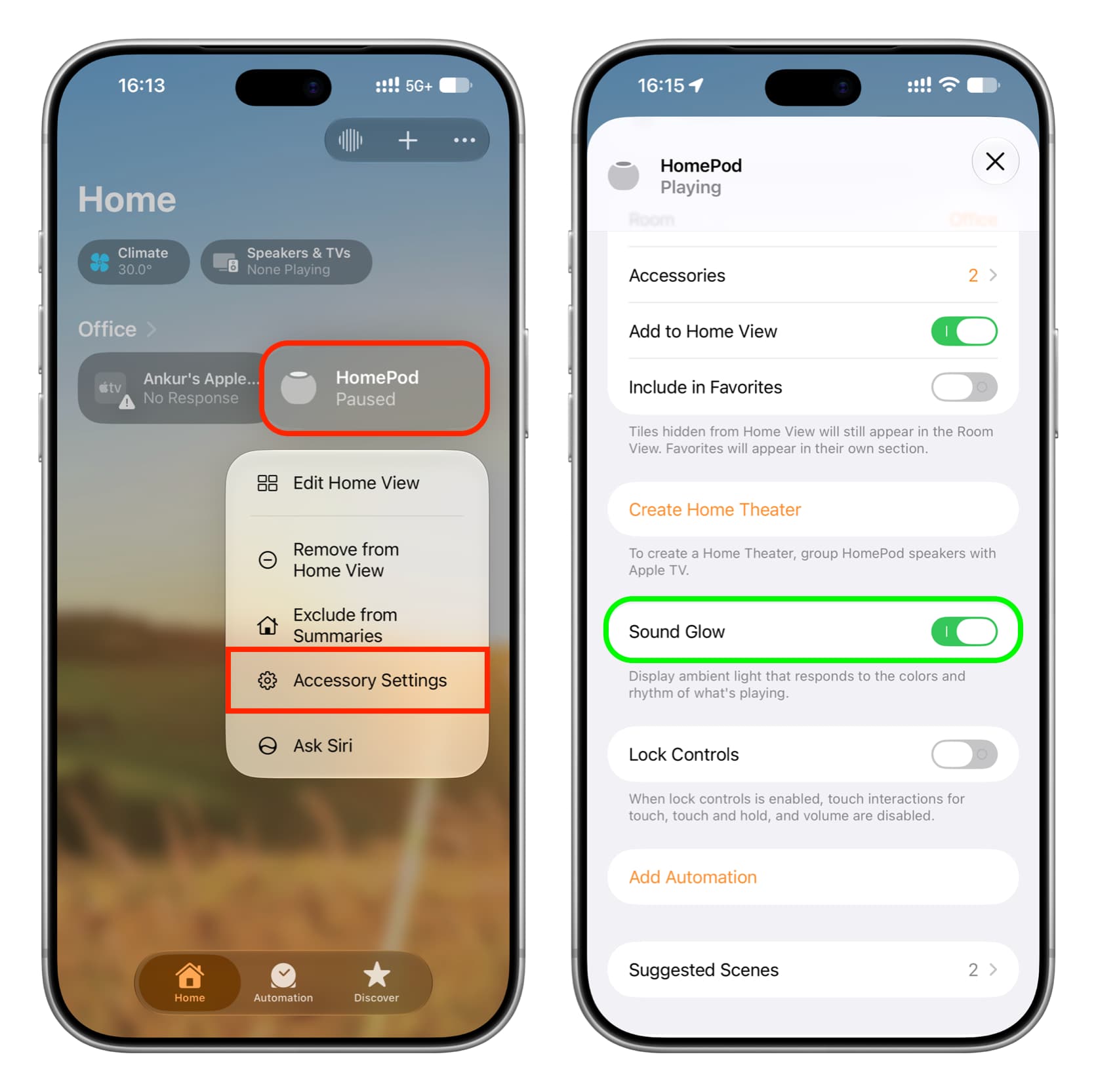
    4. Touch and hold your HomePod tile, then select Accessory Settings.
    5. Turn on Sound Glow.

    Turn on Sound Glow for HomePod in iPhone Home app

    Now ask Siri on HomePod to play a song or play one on your iPhone and select HomePod as the speaker. You’ll notice the top HomePod display glows in various colors and seems to match the song’s beat somewhat. If the effect isn’t apparent with a particular song, try another.

    If you don’t find the effect useful or once the novelty wears off, follow the same steps as above to turn it off. Note that it was switched off by default on my HomePod mini.

    Manage HomePod Sound Glow on Mac

    The steps are similar to iOS. Just go to HomePod settings in the macOS 27 Golden Gate Home app to toggle Sound Glow on and off.

    HomePod Sound Glow effect on Apple TV

    You can access Sound Glow settings in tvOS 27 only if your HomePod is set as a default speaker for your Apple TV (and not when you’re temporarily routing Apple TV sound to your HomePod). Go to tvOS Settings > Video and Audio > Audio Output and select your HomePod.

    You will now see a new HomePod tab in tvOS 27 Control Center. Switch to it to enable or disable Sound Glow for your HomePod or HomePod mini.

    What do you think of this?Here are some videos of Sound Glow in action on X:

    • @SSOUIC
    • @wilson_boi_101
    • How to crossfade Apple Music songs on your HomePod
    • 24 tips and tricks every HomePod user should know
    Featured HomePod HomePod mini HomePod tips How to News Push Tips Tutorial Tutorials
    Follow on Google News Follow on Flipboard
    Share. Facebook Twitter Pinterest LinkedIn Tumblr Email Copy Link
    myappsplus
    • Website

    Related Posts

    Honor’s new gaming phone & tablet have 10,000+ mAh batteries, fans, up to 240Hz OLED display

    October 22, 2026

    The iPhone Duo

    October 22, 2026

    Bose buys audio rival Skullcandy

    October 22, 2026
    Add A Comment
    Leave A Reply Cancel Reply

    Top Posts

    Cathay Pacific tests Google AI that dramatically cuts airplane contrails — tiny altitude shifts slash environmental impact by 40% in early trials

    September 8, 2026137 Views

    Drone swarm tech valued by both defense and civilian sectors, industry platform says

    September 8, 202614 Views

    Best Gaming TV 2026: High refresh rates and stunning visuals

    September 8, 202614 Views
    Latest Reviews

    MapQuest’s app surges to No. 1 in Navigation after refusing to rename Lake Ontario

    myappsplusAugust 31, 2026

    There’s already another tri-fold phone on the market, and it’s not from Samsung

    myappsplusAugust 31, 2026

    How did Iran manage to knock a UK power generator offline for four days, and what does it mean for other critical infrastructure? The experts weigh in

    myappsplusAugust 31, 2026
    Stay In Touch
    • Facebook
    • YouTube
    • TikTok
    • WhatsApp
    • Twitter
    • Instagram

    Subscribe to Updates

    Get the latest tech news from FooBar about tech, design and biz.

    Most Popular

    How did Iran manage to knock a UK power generator offline for four days, and what does it mean for other critical infrastructure? The experts weigh in

    August 31, 20260 Views

    How AI could make it harder for governments to use hacking tools

    August 31, 20260 Views

    Up to 65% off adidas

    August 31, 20260 Views
    Our Picks

    BioWare is closing, and the next Mass Effect is going with it

    October 22, 2026

    GridCraft is the open-source Excel clone for Linux I’ve been waiting for

    October 22, 2026

    Create illustrated, print-ready books with this $40 AI lifetime subscription ($499 value)

    October 22, 2026

    Subscribe to Updates

    Subscribe to our newsletter and get the latest tech news, app updates, AI trends, smartphone reviews, and exclusive deals delivered straight to your inbox.

    Facebook X (Twitter) Instagram Pinterest
    • About Us
    • Get In Touch
    • Disclaimer
    • Privacy Policy
    • Terms & Conditions
    © 2026 MyAppsPlus. All Rights Reserved.

    Type above and press Enter to search. Press Esc to cancel.