

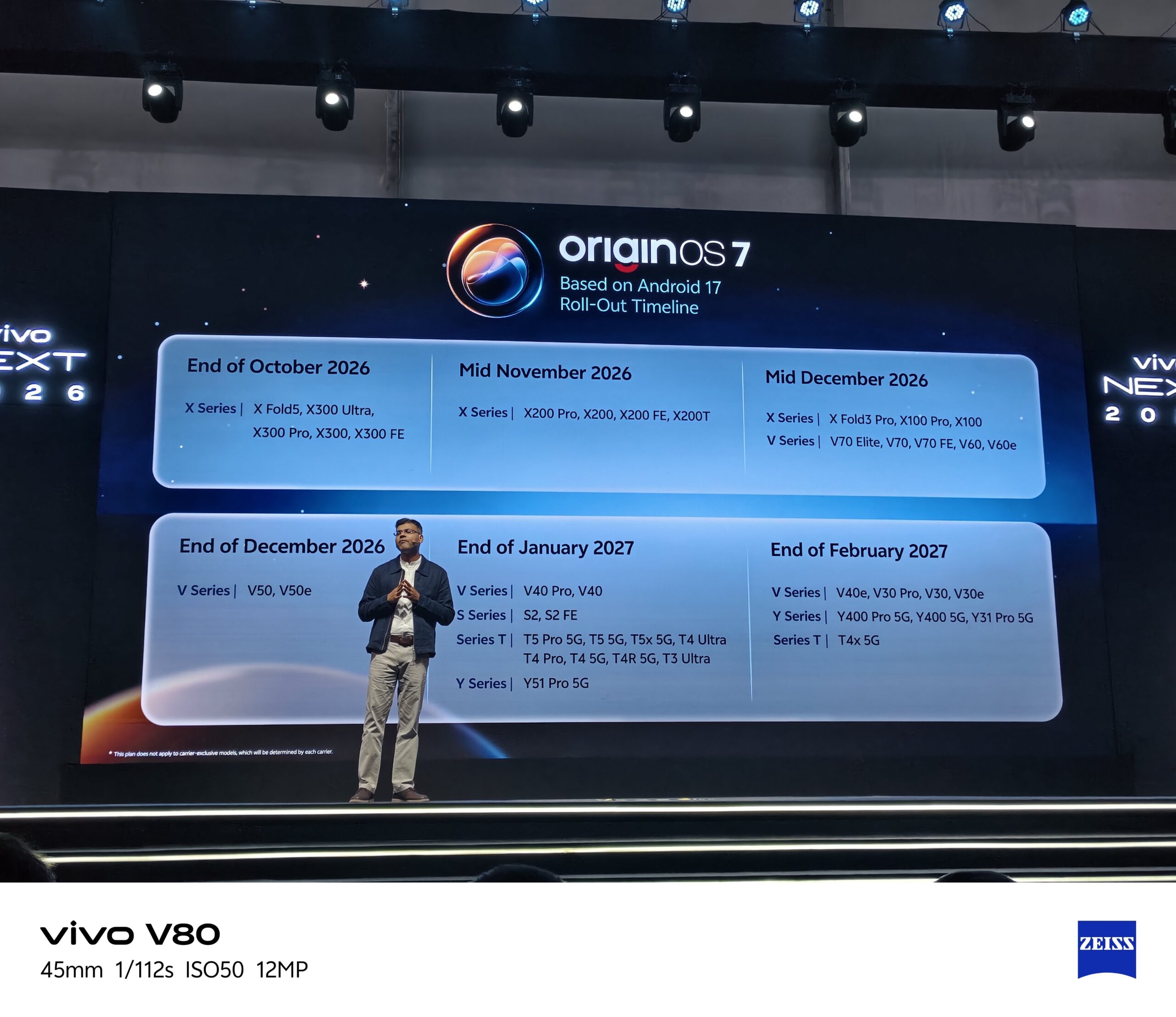
Following initial teasers surrounding the OriginOS 7 teaser features and official launch date, Vivo has officially detailed its rollout roadmap for OriginOS 7 in India. Built on top of Android 17, the update promises a massive leap forward in day-to-day smartphone performance, fluid system animations, and deeply integrated artificial intelligence.
Users can look forward to key enhancements highlighting the OriginOS 7 global Android 17 features and launch, including enhanced Jovi AI capabilities, smarter multi-tasking windows through Origin Workbench, and refined power efficiency. Furthermore, early testers have praised the update’s redesigned lock screen and smoother UI transitions introduced in the OriginOS 7 global launch features, redesign, and beta testing.
If you are wondering when your Vivo smartphone will get the update, here is the complete batch-by-batch breakdown of the OriginOS 7 deployment schedule across India.
Batch 1: End of October 2026
The flagship X-series lineup leads the charge. Users rocking Vivo’s latest premium foldable and flagship slab models will be the first to experience Android 17 in India.
Batch 2: Mid November 2026
The second phase extends the update to the previous-generation flagship X-series lineup.
Batch 3: Mid December 2026
Batch 4: End of December 2026
Wrapping up the year, Vivo will roll out the update to its popular mid-range V-series smartphones.
Batch 5: End of January 2027
Kicking off the new year, the rollout broadens significantly to cover previous-gen V-series devices along with the mid-range S-series, performance-focused T-series, and budget Y-series models.
Batch 6: End of February 2027
The final major phase brings Android 17 to remaining entry-level and mid-tier devices across the V, Y, and T series.
Key Notes on the Rollout
-
Carrier Exclusions: Note that carrier-exclusive variants are excluded from this standard roadmap schedule and may follow separate timelines dictated by service providers.
-
Staggered Deployment: Software updates are pushed in batches over-the-air (OTA) to ensure system stability. Even if your device is listed for a specific month, it may take a few days for the notification to pop up on your specific handset.
-
How to Check: Once your release window opens, navigate to Settings > System Update > Check for Updates on your Vivo smartphone to download and install OriginOS 7 manually.
