


Fox News Flash top headlines for October 6
Fox News Flash top headlines are here. Check out what’s clicking on FoxNews.com.
NEWYou can now listen to Fox News articles!
Most of us have done it. A software update pops up when we’re busy, so we swipe it away and figure we’ll deal with it later. Then later turns into tomorrow, and suddenly that update has been sitting there much longer than we planned. There’s another wrinkle. Even when your phone appears to be running the latest software, there may be another security update or protection worth checking.
Apple, Google and Samsung all have ways to get security fixes onto your phone between larger software releases. However, they handle those protections differently. If you use an iPhone running iOS 27, a Google Pixel running Android 17 or a Samsung Galaxy running the latest software available for your model, there are a few places I would check right now.
Join us for a free CyberGuy LIVE class.
Kurt “CyberGuy” Knutsson shares practical ways to stay safer, smarter and more confident with technology. Explore classes on stopping spam, phone security, financial protection and using AI to get better healthcare. Each class is free, easy to follow and comes with a free printable checklist.
See the classes and register at CyberGuyLive.com
TURN ON LOST-PHONE SETTINGS BEFORE YOU NEED THEM
Keeping your phone’s software current can help close security holes before attackers have a chance to exploit them.(Kurt “CyberGuy” Knutsson)
Your iPhone can get security fixes between full updates
Apple has a feature called Background Security Improvements that can deliver certain security protections without waiting for another complete iOS update. Apple says these lightweight releases can protect Safari, WebKit and other system libraries. That gives Apple another way to address certain vulnerabilities between larger software releases. iOS 27 is Apple’s latest public iPhone software, so make sure your compatible iPhone is running it before checking the security setting below.
How to check that your iPhone is running the latest iOS software
- Open Settings
- Tap General
- Tap Software Update
- Install any available update
If your iPhone says iOS 27 and no newer update appears, you’re current at the time you check.
How to turn on Background Security Improvements on iPhone
- Open Settings
- Tap Privacy & Security
- Tap Background Security Improvements
- Turn on Automatically Install
Your iPhone can then automatically install eligible Background Security Improvements as Apple releases them. These smaller protections do not replace regular iOS updates. You should still install full updates because they can contain additional security patches, bug fixes and broader changes throughout the operating system.
HOW TO FIND COMPROMISED PASSWORDS ON IPHONE AND ANDROID
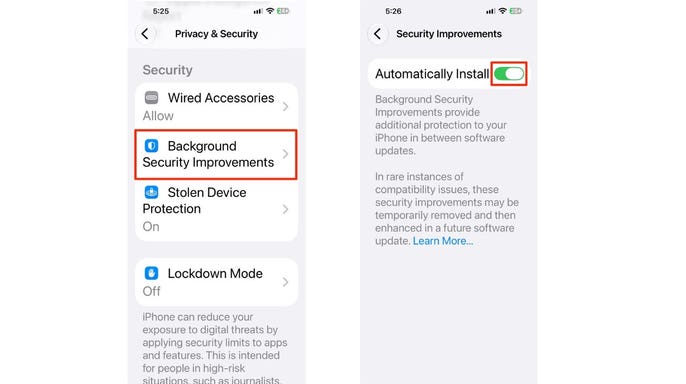
On iPhone, Background Security Improvements can install certain protections automatically between full iOS updates.(Kurt “CyberGuy” Knutsson)
Samsung Galaxy phones have their own update process
Samsung Galaxy phones run Android, but Samsung adds its One UI software on top. Because of that, Galaxy owners often see different menus than Pixel owners. As of today, One UI 9 is Samsung’s latest interface. Samsung began its U.S. rollout on Sept. 16 with the Galaxy S26 Ultra, S26+ and S26 after One UI 9 debuted on its newest foldable phones. However, you should not assume that every Galaxy phone eligible for One UI 9 has received it yet. Samsung rolls updates out by device, carrier and region. Whether your Galaxy has One UI 9 already or is still waiting for it, you can check directly from Settings.
How to check for the latest Samsung Galaxy software
- Open Settings
- Scroll down and tap Software update
- Tap Check for updates
Depending on your Galaxy model or carrier, Samsung says you may instead see Download and install, System updates or Check for software updates. If an update appears, follow the on-screen instructions to install it. You can also check which version your phone is running by going to:
- Settings
- About phone
- Software information
That screen shows details about the software currently installed on your Galaxy.
How to check the Google Play system update on Samsung Galaxy
Galaxy phones also use Google’s underlying system services, so there is one more update worth checking.
- Open Settings
- Tap About phone
- Tap Software information
- Tap Google Play system update
- Follow the prompts if an update is available
If you have a Samsung Galaxy, you may be running the latest Samsung software available for your phone and still have a separate Google Play system update waiting to install.
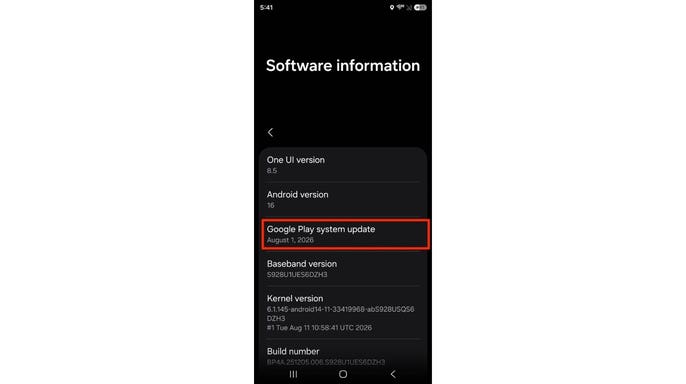
Samsung Galaxy phones can have a separate Google Play system update waiting even when Samsung’s own software looks current.(Kurt “CyberGuy” Knutsson)
Google Pixel uses a different security update system
Pixel owners will not find Apple’s Background Security Improvements setting. Google handles the job differently. As of today, supported Pixel phones are running Android 17. Google began rolling out its September 2026 Pixel software update on Sept. 15, while the October 2026 Android Security Bulletin was published Oct. 5. Pixel phones receive regular Android software updates that can include security fixes. They also receive Google Play system updates, which let Google update certain parts of Android separately from a complete operating system release. That means Pixel owners should check two areas rather than assuming one update screen tells the whole story.
How to check for the latest update on Google Pixel
On a Pixel running Android 17:
- Open Settings
- Tap System
- Tap Software update
- Check your update status
- Follow the on-screen instructions if an update is available
Google says supported Pixel devices running Android 17 are receiving the September 2026 software update in phases. Your exact availability can depend on the device and carrier. Pixel phones can also install downloaded Android updates in the background. However, you may need to restart the phone before the update becomes active.
How to check the Google Play system update on Pixel
You should check this separately:
- Open Settings
- Tap About phone
- Tap Android version
- Check Android security update
- Check Google Play system update
If an update is available, follow the prompts to install it. The Google Play system update can be easy to overlook because the name sounds like an update for the Play Store. It actually helps Google update underlying parts of Android and its system services.
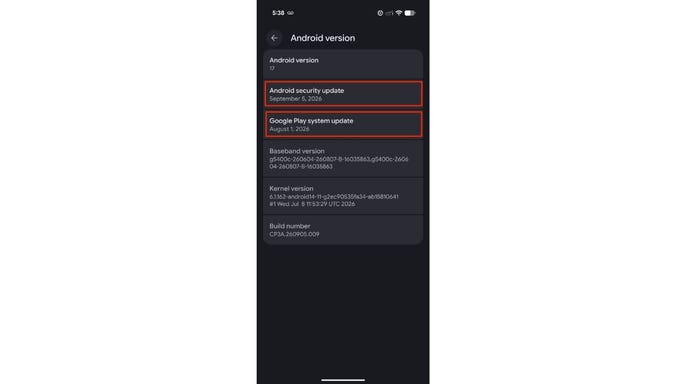
Pixel owners should check both the Android security update and Google Play system update to make sure every layer is current.(Kurt “CyberGuy” Knutsson)
Don’t assume automatic updates mean you’re fully current
I’m a fan of automatic updates because they remove one more thing you have to remember. Still, I wouldn’t turn them on and completely forget about them. An update might need your phone to restart before the protection becomes active. Your device may also be waiting for Wi-Fi, sufficient battery power or the next stage of a phased rollout. That’s why I like checking the update screens every so often. If you see an update waiting, finish it. A downloaded security fix cannot fully protect you if your phone still needs a restart before activating it.
Older phones may eventually stop getting security fixes
Your phone can keep working long after the manufacturer stops supporting it. That’s where things can get tricky. If a phone no longer receives security updates, newly discovered vulnerabilities may remain unpatched. That can leave an otherwise usable device exposed to security problems that newer phones have already fixed. Apple supports iPhones with software and security updates for years, but older models eventually stop receiving the newest iOS releases. If you’re wondering whether your current iPhone has reached that point, check out our guide on whether it’s time to upgrade to a new iPhone at CyberGuy.com.
Google currently provides seven years of operating system and security updates for Pixel 8 and newer phones, measured from when each device first became available in the U.S. Samsung also provides extended software support for many newer Galaxy devices, although the support period depends on the model. If your iPhone, Pixel or Samsung Galaxy no longer receives security updates, that should become part of the decision about when it’s time to replace it. If you’re thinking about upgrading your Pixel or Samsung Galaxy, take a look at our Top Android phones of 2026 for our current picks at cyberguy.com .
Keep your phone protected beyond software updates
Updates close known security holes, but criminals have plenty of other ways to go after your phone. Phishing texts can trick you into handing over passwords. Fake websites can imitate Apple, Google or a financial institution. Malicious apps can also create problems if you install software from an untrusted source.
That’s why I would combine current software with a strong device passcode, biometric protection and the theft-protection features available on your phone. I would also use a password manager to create and store strong, unique passwords for your accounts. Strong antivirus software can add another layer by helping detect malicious links, risky downloads and other threats before they cause trouble. Get my picks for the best 2026 antivirus protection winners for your Windows, Mac, Android and iOS devices at CyberGuy.com.
Kurt’s key takeaways
I like security protections that can do some of the work for me. I’m not going to spend every morning checking whether Apple patched WebKit or whether Google released another system update, and I don’t expect you to either. Still, seeing “up to date” on one screen does not always mean you’ve checked every security layer your phone uses. On my iPhone, I’d look at Background Security Improvements and Software Update. If you’re carrying a Pixel, check both the Android update and Google Play system update. Galaxy owners should check Samsung’s software update and Google’s system update too. Then finish the job when your phone asks for a restart. That extra minute could be what finally activates the protection you thought was already there.
Have you ever checked your phone’s update screen and found a security update waiting that you didn’t know about? Let us know by writing to us at CyberGuy.com.
- Get my best tech tips, urgent security alerts and exclusive deals delivered straight to your inbox.
- For simple, real-world ways to spot scams early and stay protected, visit CyberGuy.com – trusted by millions who watch CyberGuy on TV daily.
- Plus, you’ll get instant access to my Ultimate Scam Survival Guide free when you join.
Copyright 2026 CyberGuy.com. All rights reserved.
