
Close Menu
MyAppsPlus

    Subscribe to Updates

    Get the latest creative news from FooBar about art, design and business.

    What's Hot

    Successes, failures, and fun along the way [Video]

    October 4, 2026

    Redesigned MacBook Pro with OLED to feature ‘significantly lighter’ design: report

    October 4, 2026

    How getting rid of some USB gadgets can improve your bad Wi-Fi

    October 4, 2026
    Facebook X (Twitter) Instagram
    Facebook X (Twitter) Instagram
    MyAppsPlusMyAppsPlus
    Sunday, October 4
    • Home
    • Breaking Tech
    • Apps & Software
    • AI & Automation
    • Android
    • iPhone & iOS
    • More
      • Reviews
      • How-To Guides
      • Deals & Discounts
      • Shop
    MyAppsPlus
    Home»Android»How to use Android’s Motion Assist feature to help with motion sickness
    Android

    How to use Android’s Motion Assist feature to help with motion sickness

    myappsplusBy myappsplusOctober 4, 2026003 Mins Read
    Share Facebook Twitter Pinterest Copy Link LinkedIn Tumblr Email Telegram WhatsApp
    Follow Us
    Google News Flipboard
    How to use Android’s Motion Assist feature to help with motion sickness
    Share
    Facebook Twitter LinkedIn Pinterest Email Copy Link

    Google finally launched its answer to Apple’s Vehicle Motion Cues.

    If you’re prone to getting carsick, looking at your phone while you’re riding in a car definitely won’t help. However, Google has been rolling out some interesting new features — and one of them is called Motion Assist. With this new option enabled, Android users have a better chance of scrolling without getting motion sick.

    While the technology itself isn’t necessarily groundbreaking, as Apple unveiled its version back in 2024 as part of iOS 18, the feature has finally made its way over to Android devices. It can only be found on Android devices running Android 17 or higher and updated Google Play Services, but those who can access it will find activating Motion Assist a breeze. So, if you just picked up any of the new Pixel 11 models, you can test it out anytime. Samsung phones must be running One UI 9. 

    This article will cover how to enable and customize Motion Assist on Pixel phones, so if your phone is another brand, the menus may vary. Searching “Motion Assist” in settings may be your most direct path to this feature.

    How does Motion Assist help with motion sickness?

    A man holds his head in his hands in front of a blurred, swirling background.

    Motion sickness comes down to a battle of the senses. When you’re in a car, your inner ear tracks every turn, stop and sudden burst, which tells your brain you’re moving. So if your eyes are locked on a static screen, your brain gets conflicting signals, since your eyes are essentially telling it you are still.

    That imbalance is what leaves people feeling nauseous, and it’s the exact conflict Google’s new feature is designed to resolve.

    Using your device’s motion sensors, the small shapes on your screen move around based on the car’s every maneuver, which Google says helps “your brain synchronize what your eyes see with what your body feels.” And while the shapes hover and shift in real time, they stick to the display’s edges, so whatever you’re reading or watching in the middle stays unobscured. Of course, Google asserts this feature is meant for passengers, so don’t try to use it if you’re the one driving.

    How to set up Android’s Motion Assist feature
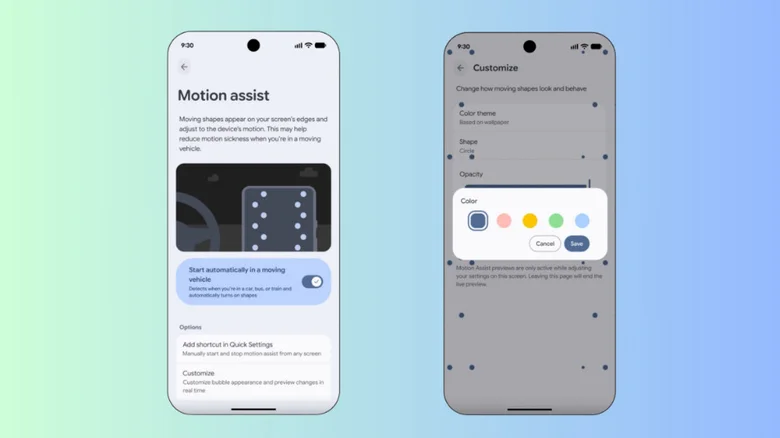
    The Motion Assist settings and customization menu on an Android device.

    Screenshots by Yoni Yardeni (Google)

    You can activate Motion Assist easily in your device’s settings. On your Pixel, navigate to the Settings app, then tap your profile and select All services. From there, you can toggle Motion Assist on from the Personal & device safety menu.

    To prevent motion sickness on future rides, you can also adjust your phone’s settings to automatically activate Motion Assist when it senses you’re in a moving vehicle. In the Motion Assist settings, simply turn on Start automatically in a moving vehicle. Even with this enabled, your phone’s motion sensors may have a hard time knowing when you’re in a moving car, so Google recommends adding it to your Quick Settings menu to ensure it’s always just a couple of taps away.

    Similar to Apple’s Vehicle Motion Cues, Google allows you to customize the colors, opacity and shapes that appear when Motion Assist is activated, so you can fine-tune the details as you see fit. Access these options in the Customize menu, which you can tap into from the Motion Assist settings. There is also a Randomization option that changes the colors and shapes as you use it.

    Androids Assist feature Help motion
    Follow on Google News Follow on Flipboard
    Share. Facebook Twitter Pinterest LinkedIn Tumblr Email Copy Link
    myappsplus
    • Website

    Related Posts

    Successes, failures, and fun along the way [Video]

    October 4, 2026

    Redesigned MacBook Pro with OLED to feature ‘significantly lighter’ design: report

    October 4, 2026

    Department of Health launches mobile app to help Hawaiʻi quit tobacco

    October 4, 2026
    Add A Comment
    Leave A Reply Cancel Reply

    Top Posts

    Can reviews settle disputes that marked first two seasons?

    September 21, 20268 Views

    Experts call for leveraging AI, breaking key tech bottlenecks to propel advanced manufacturing

    September 19, 20266 Views

    Here’s what happens to your old computer parts you donate to Goodwill

    September 28, 20264 Views
    Latest Reviews

    SpaceX is building a $100 billion ‘Starbase’ launch site in Louisiana

    myappsplusAugust 26, 2026

    ‘If we stuck with the silent protagonist method, we wouldn’t be able to tell this story properly’ — Metro 2039 executive producer says making The Stranger a speaking protagonist ‘goes hand in hand with telling a personal story’

    myappsplusAugust 26, 2026

    Bill Gates says we’ve passed AI’s danger thresholds. Now what?

    myappsplusAugust 26, 2026
    Stay In Touch
    • Facebook
    • YouTube
    • TikTok
    • WhatsApp
    • Twitter
    • Instagram

    Subscribe to Updates

    Get the latest tech news from FooBar about tech, design and biz.

    Most Popular

    ‘If we stuck with the silent protagonist method, we wouldn’t be able to tell this story properly’ — Metro 2039 executive producer says making The Stranger a speaking protagonist ‘goes hand in hand with telling a personal story’

    August 26, 20260 Views

    Bill Gates says we’ve passed AI’s danger thresholds. Now what?

    August 26, 20260 Views

    AI gold rush draws crypto firms away from Bitcoin

    August 26, 20260 Views
    Our Picks

    Successes, failures, and fun along the way [Video]

    October 4, 2026

    Redesigned MacBook Pro with OLED to feature ‘significantly lighter’ design: report

    October 4, 2026

    How getting rid of some USB gadgets can improve your bad Wi-Fi

    October 4, 2026

    Subscribe to Updates

    Subscribe to our newsletter and get the latest tech news, app updates, AI trends, smartphone reviews, and exclusive deals delivered straight to your inbox.

    Facebook X (Twitter) Instagram Pinterest
    • About Us
    • Get In Touch
    • Disclaimer
    • Privacy Policy
    • Terms & Conditions
    © 2026 MyAppsPlus. All Rights Reserved.

    Type above and press Enter to search. Press Esc to cancel.