


Fox News Flash top headlines for September 30
Fox News Flash top headlines are here. Check out what’s clicking on FoxNews.com.
NEWYou can now listen to Fox News articles!
You know the feeling. Your phone rings, you look down and see a number you do not recognize. Now you have to decide whether to answer or let it go to voicemail. That choice gets harder when you are expecting a call from a doctor, repair person or someone else who may not be in your contacts.
Fortunately, your phone can now help figure out who is on the other end before you get involved. With iOS 27, your iPhone can ask an unknown caller for their name and why they are calling. Google Pixel phones have their own Call Screen feature. Compatible Samsung Galaxy phones can also use AI-powered call screening. Here is how each one works on the latest software.
Missed CyberGuy LIVE? Watch the replay and discover 5 ways AI can help you get better healthcare.
Our free CyberGuy LIVE class Get Better Healthcare With AI has ended, but you can still watch the full replay. Kurt “CyberGuy” Knutsson walks you through five practical ways AI can help you organize your health history, remember important appointment details, understand complicated medical information, research prescriptions and prepare smarter questions for your doctor. No technical experience is needed.
Watch the free replay + downloadable checklist now at CyberGuyLive.com
ANDROID FAKE CALL DETECTION WARNS YOU ABOUT SCAMS
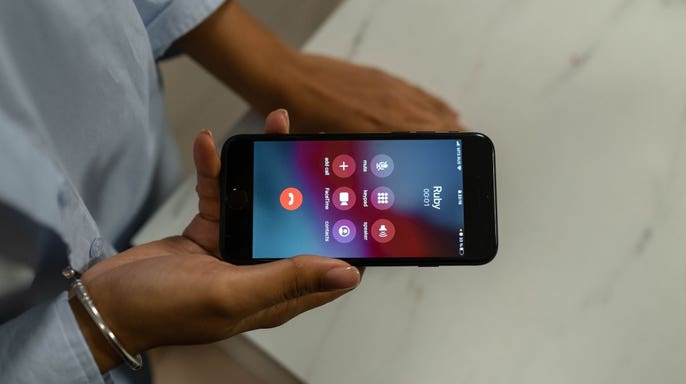
Call screening tools can help you decide whether an unknown caller deserves your attention before you answer.(Kurt “CyberGuy” Knutsson)
How to screen unknown callers on iPhone
Apple’s Call Screening feature can automatically answer calls from unknown numbers without interrupting you. The caller gets asked for their name and the reason for the call. After they respond, your iPhone rings and shows you what they said. That gives you a little more information before deciding whether to answer.
How to turn on Call Screening on iPhone
- Open Settings
- Scroll down and tap Apps
- Tap Phone
- Scroll to Screen Unknown Callers
- Select Ask Reason for Calling
Once you turn it on, calls from unknown numbers are asked for more information before your iPhone rings. Apple also gives you two other options in the same section. Never turn Call Screening off. Silence sends calls from unsaved numbers directly to voicemail and keeps them in your Recents list. For many people, Ask Reason for Calling may offer a useful middle ground. You can still hear from someone important without immediately answering every unfamiliar number.
You can filter suspected spam calls too
While you are in the Phone settings, you can also review Apple’s call filtering options. Go to Settings → Apps → Phone, then scroll to the call filtering section. Turning on Spam lets your carrier identify potential spam or fraud calls. Those calls can then be silenced, sent to voicemail and moved into the Spam list. You can also turn on Unknown Callers. That moves calls from unknown numbers out of your main Recents list and into a separate Unknown Callers list.
FAKE VERIZON FRAUD CALL NEARLY STOLE HIS ACCOUNT
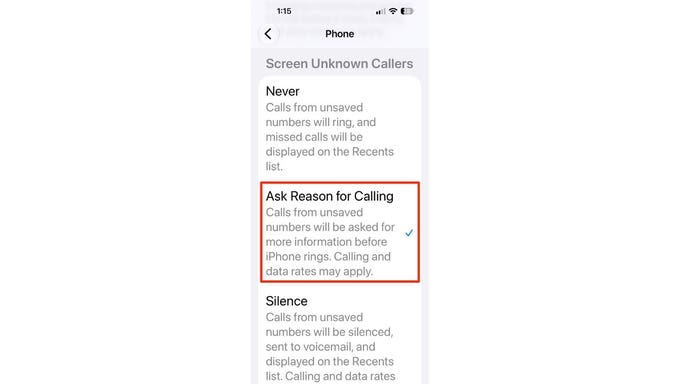
iOS 27 can ask callers from unsaved numbers why they are calling before your iPhone rings.(Kurt “CyberGuy” Knutsson)
How Samsung Galaxy screens unknown calls
Samsung has also brought call screening to compatible Galaxy phones. Samsung says the feature is available on supported Galaxy phones running One UI 8.5 or later. However, feature availability can still vary by Galaxy model, carrier and region. Galaxy Call screening can answer the caller and ask why they are calling. You can then read the caller’s response as a live transcription.
How to turn on Call screening on Samsung Galaxy
- Open the Phone app
- Tap the three vertical dots
- Tap Settings
- Tap Call screening
- Turn on Call screening
- Turn on Auto screen calls if you want unknown calls screened automatically
Samsung also lets you choose a transcription language and customize the assistant’s voice. If you prefer to decide which calls get screened, you can do that manually. When an incoming call appears, tap Call assist, then tap Call screening. The AI assistant answers for you and asks the caller to state the purpose of the call. Their response then appears as text on your screen. If you do not see Call screening, check for the latest Galaxy software update. You should also make sure the Samsung Phone app is current. Some Galaxy models may not support the feature.
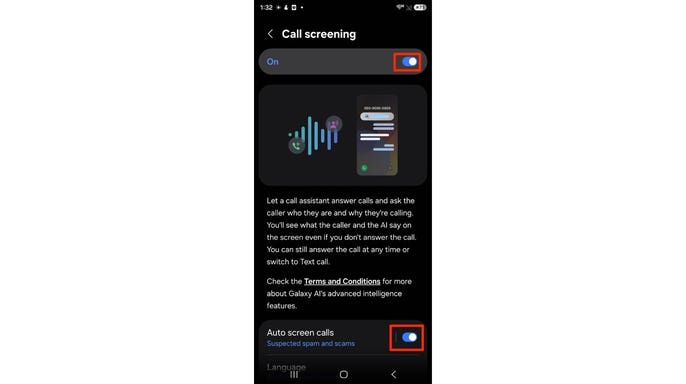
On compatible Samsung Galaxy phones, turn on Call screening and Auto screen calls to automatically screen suspected spam and scam calls.(Kurt “CyberGuy” Knutsson)
How to screen unknown calls on a Google Pixel
Google Pixel phones take a slightly different approach with Call Screen. The feature can answer certain calls for you and ask the caller why they are calling. Depending on your Pixel and settings, Google can also screen some calls automatically.
How to turn on Call Screen on Pixel
- Open the Phone app
- Tap the three dots
- Tap Settings
- Tap Spam and Call Screen or Call Screen
- Tap Call Screen
- Turn on Automatic Call Screen
- Choose your preferred protection level
On newer Pixel phones, you may see Maximum protection, Medium protection and Basic protection. Medium protection is Google’s recommended setting and screens suspicious calls while declining known spam. Maximum protection screens unknown numbers more aggressively, while Basic protection mainly declines known spam. You can still screen a call manually. When an unfamiliar number comes in, tap Screen call. Call Assist will ask who is calling and why while you watch the response appear as a live transcript. From there, you can answer the call, hang up or use one of the suggested responses.
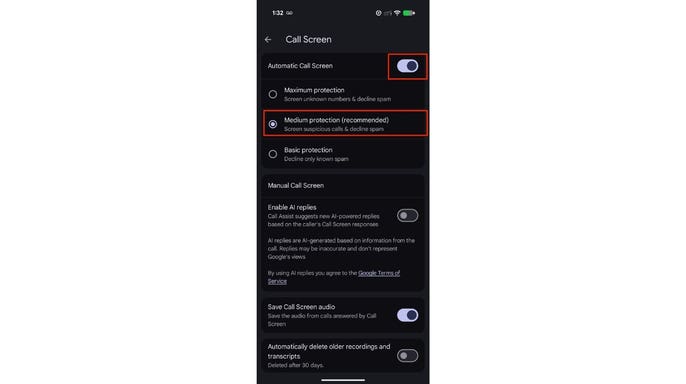
Pixel’s Automatic Call Screen can screen suspicious calls and decline known spam before they reach you.(Kurt “CyberGuy” Knutsson)
Why screening can beat automatically silencing every unknown caller
Sending every unfamiliar number straight to voicemail certainly cuts down on interruptions. However, it can also send legitimate callers there. Maybe you are waiting for a medical office to call from a number you have never seen. Perhaps a service technician needs to reach you from a work phone. Call screening gives that person a chance to explain why they are trying to reach you. You can then make the call about whether to answer.
There is also a security benefit. Scam callers often count on getting someone on the phone quickly. Screening puts another step between the caller and you. However, do not assume someone is legitimate simply because they answered the screening question. Scammers can still lie about who they are. Caller ID can also be spoofed.
Do not let a convincing answer lower your guard
Call screening gives you information. It does not verify someone’s identity. If a caller claims to represent your bank or another company and suddenly asks for money or login information, end the call. The same advice applies if someone asks for a one-time security code. Instead, contact the organization yourself through its official app or website. For financial accounts, you can also use the phone number printed on your card or statement. This is especially important because phone scams continue to get more convincing. Scammers can spoof familiar numbers and create a sense of urgency to push you into acting quickly.
Kurt’s key takeaways
I like the idea of making an unknown caller explain themselves before they get my attention. With iOS 27, iPhone owners can have unfamiliar callers provide a name and reason before the phone rings. Pixel owners can use Google’s Call Screen, while compatible Galaxy phones offer their own call screening feature. For me, screening makes more sense than automatically silencing every unfamiliar number. There are plenty of legitimate reasons someone outside your contacts may need to reach you. Still, treat the screening response as information rather than proof. If the conversation turns to passwords, money or account access, hang up and contact the company yourself.
Would you rather have your phone screen every unknown caller first, or do you still prefer sending unfamiliar numbers straight to voicemail? Let us know by writing to us at CyberGuy.com.
- Get my best tech tips, urgent security alerts and exclusive deals delivered straight to your inbox.
- For simple, real-world ways to spot scams early and stay protected, visit CyberGuy.com – trusted by millions who watch CyberGuy on TV daily.
- Plus, you’ll get instant access to my Ultimate Scam Survival Guide free when you join.
Copyright 2026 CyberGuy.com. All rights reserved.
