
Close Menu
MyAppsPlus

    Subscribe to Updates

    Get the latest creative news from FooBar about art, design and business.

    What's Hot

    Viral AI agent Instinct raises $1B Series C at a $10B valuation

    September 28, 2026

    Apple confirms iPhone 18 Pro Face ID freezing bug — what you need to know

    September 28, 2026

    Tesla Launches Grok in New Countries With Update 2026.32.7

    September 28, 2026
    Facebook X (Twitter) Instagram
    Facebook X (Twitter) Instagram
    MyAppsPlusMyAppsPlus
    Monday, September 28
    • Home
    • Breaking Tech
    • Apps & Software
    • AI & Automation
    • Android
    • iPhone & iOS
    • More
      • Reviews
      • How-To Guides
      • Deals & Discounts
      • Shop
    MyAppsPlus
    Home»iPhone & iOS»Apple Notes keeps getting better, here’s what’s new in iOS 27
    iPhone & iOS

    Apple Notes keeps getting better, here’s what’s new in iOS 27

    myappsplusBy myappsplusSeptember 28, 2026004 Mins Read
    Share Facebook Twitter Pinterest Copy Link LinkedIn Tumblr Email Telegram WhatsApp
    Follow Us
    Google News Flipboard
    Apple Notes keeps getting better, here’s what’s new in iOS 27
    Share
    Facebook Twitter LinkedIn Pinterest Email Copy Link

    iOS 27 adds new features for CarPlay, the Messages app, and a lot more, including a handful of Apple Notes upgrades. Here’s what’s new for Apple Notes in iOS 27.

    Divider line added for organizing your notes


    Joining the many different formatting tools already available in Apple Notes, iOS 27 lets you add divider lines to your notes.

    It’s pretty simple. Just tap where you want the line to go, open the edit menu, and choose the new ‘Insert Divider Line’ option.

    Divider lines are a great new way to organize content in a note, and a welcome addition to the Notes toolset.

    Section links


    Section links are now supported in iOS 27’s Notes app, letting you build a table of contents or other structure to navigate longer notes with ease.

    To create a section link, select text inside your and open the edit menu. From there, hit ‘Add Link’ to see a new option: Link to Section.

    This opens a menu where you’ll find all of the headings and subheadings currently found in your note. You can tap to select one, which will create a direct link to that section embedded in your text.

    Create and add to notes with Siri AI

    The single Notes upgrade I’m most excited about in iOS 27 involves Siri.

    Apple’s new Siri AI lets you quickly, seamlessly add information to a new note or existing note in Apple Notes.

    You can do this, for example, with any answer Siri provides in the new Siri app. Or you can do what I did (seen above) where I asked Siri to take a poorly formatted list and reformat it, then add it to a new note.

    This works for existing notes too, just tell Siri which note you want to add to. Siri has offered some limited Notes capabilities in the past, but the new integration is a big upgrade.

    Copy and paste Markdown

    Last year in iOS 26, Apple Notes gained support for importing and exporting Markdown.

    If you’re unfamiliar with Markdown, it’s a text formatting syntax created by John Gruber. With Markdown, you can write in plain text using special syntax for headings, links, lists, bold and italics formatting, and more. It’s a popular tool for writers who publish content online.

    With iOS 27, Apple Notes is getting even more Markdown-friendly.

    Now when you paste Markdown-formatted text into a note, it’s automatically converted into rich text. There are zero extra steps required. And if you want to copy text from your note as Markdown, there’s a new Copy as Markdown option you’ll find in the edit menu.

    Image Playground upgrades
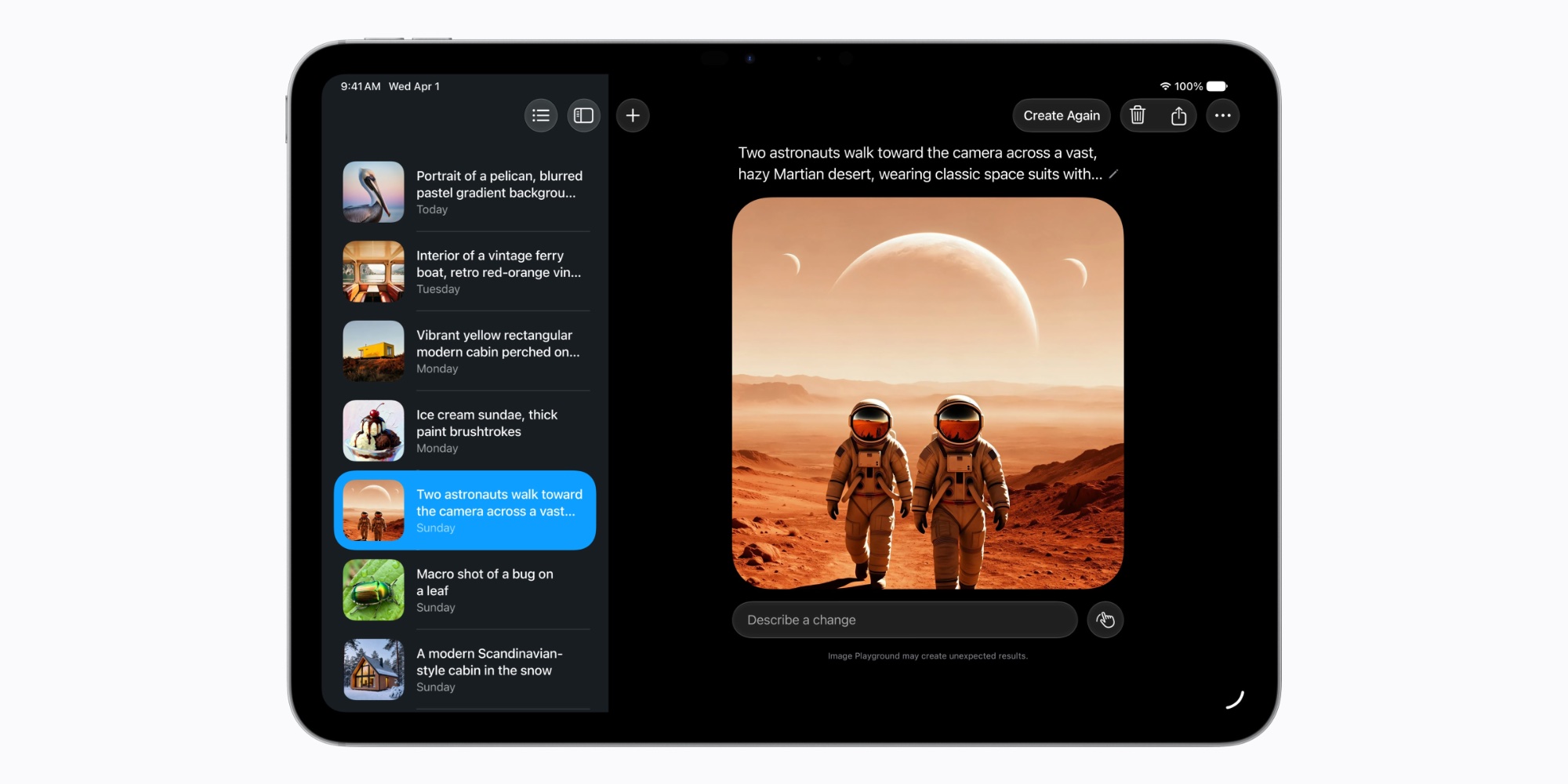

    iOS 27 brings big upgrades to the Image Playground app and its underlying AI models. And since Image Playground is a key built-in feature of the Notes app, Notes users benefit too.

    Image Playground offers new powerful ways for users to bring their imagination to life. They can create high-quality images in virtually any style, now including photorealistic, thanks to a new generative model that runs on Private Cloud Compute. This is a major transformation for image generation across platforms. And generated images will automatically include a hidden SynthID watermark to identify them as AI-generated.

    Apple Notes in iOS 27: wrap-up

    Notes also features a variety of smaller UI refinements in iOS 27, including:

    • Newly refreshed app icon
    • Liquid Glass updates for buttons, menus, and more
    • Shared folder at top of folders list adds new icon
    • Individual shared folders and notes have updated icons too

    What are your favorite new Apple Notes features in iOS 27? Let us know in the comments.

    Best iPhone accessories

    You’re reading 9to5Mac — experts who break news about Apple and its surrounding ecosystem, day after day. Be sure to check out our homepage for all the latest news, and follow 9to5Mac on Twitter, Facebook, and LinkedIn to stay in the loop. Don’t know where to start? Check out our exclusive stories, reviews, how-tos, and subscribe to our YouTube channel

    Apple getting keeps News Notes
    Follow on Google News Follow on Flipboard
    Share. Facebook Twitter Pinterest LinkedIn Tumblr Email Copy Link
    myappsplus
    • Website

    Related Posts

    Apple confirms iPhone 18 Pro Face ID freezing bug — what you need to know

    September 28, 2026

    The best and final iteration of the current form factor?

    September 28, 2026

    I used the iPhone 17 for a year, but the Pixel 11 won me over for 5 key reasons

    September 28, 2026
    Add A Comment
    Leave A Reply Cancel Reply

    Top Posts

    Can reviews settle disputes that marked first two seasons?

    September 21, 20267 Views

    Microsoft resolves issues after software updates

    September 22, 20263 Views

    Do Tech Industry CEOs Really Earn an Average of 10,000 Yuan Per Day? Calculating Daily Salaries of Top Elite Employees in the Tech Sector

    September 20, 20263 Views
    Latest Reviews

    How is Android Auto different from Android Automotive?

    myappsplusAugust 23, 2026

    China is shifting its new data centers to rural Eastern locations as it looks for extra AI power

    myappsplusAugust 23, 2026

    The Razer Soma Chroma has a silly name, silly price tag, and sillily requires you bring your own battery to light the thing up

    myappsplusAugust 23, 2026
    Stay In Touch
    • Facebook
    • YouTube
    • TikTok
    • WhatsApp
    • Twitter
    • Instagram

    Subscribe to Updates

    Get the latest tech news from FooBar about tech, design and biz.

    Most Popular

    China is shifting its new data centers to rural Eastern locations as it looks for extra AI power

    August 23, 20260 Views

    The Razer Soma Chroma has a silly name, silly price tag, and sillily requires you bring your own battery to light the thing up

    August 23, 20260 Views

    What is a VESA mount and how to know what type your TV has

    August 23, 20260 Views
    Our Picks

    Viral AI agent Instinct raises $1B Series C at a $10B valuation

    September 28, 2026

    Apple confirms iPhone 18 Pro Face ID freezing bug — what you need to know

    September 28, 2026

    Tesla Launches Grok in New Countries With Update 2026.32.7

    September 28, 2026

    Subscribe to Updates

    Subscribe to our newsletter and get the latest tech news, app updates, AI trends, smartphone reviews, and exclusive deals delivered straight to your inbox.

    Facebook X (Twitter) Instagram Pinterest
    • About Us
    • Get In Touch
    • Disclaimer
    • Privacy Policy
    • Terms & Conditions
    © 2026 MyAppsPlus. All Rights Reserved.

    Type above and press Enter to search. Press Esc to cancel.