Close Menu
MyAppsPlus

    Subscribe to Updates

    Get the latest creative news from FooBar about art, design and business.

    What's Hot

    Google’s new ‘CC’ is an AI agent that helps families run their households

    September 19, 2026

    Google Gemini accessed protected systems of 3 real companies during artificial intelligence cybersecurity test

    September 19, 2026

    ICYMI: the 7 biggest tech stories of the week, from AI apocalypse warnings to our Apple CEO interview

    September 19, 2026
    Facebook X (Twitter) Instagram
    Facebook X (Twitter) Instagram
    MyAppsPlusMyAppsPlus
    Saturday, September 19
    • Home
    • Breaking Tech
    • Apps & Software
    • AI & Automation
    • Android
    • iPhone & iOS
    • More
      • Reviews
      • How-To Guides
      • Deals & Discounts
      • Shop
    MyAppsPlus
    Home»Deals & Discounts»How to make IKEA and Philips Hue smart lights play nicely together, from simple hub pairing to fun DIY hardware hacks
    Deals & Discounts

    How to make IKEA and Philips Hue smart lights play nicely together, from simple hub pairing to fun DIY hardware hacks

    myappsplusBy myappsplusSeptember 19, 2026004 Mins Read
    Share Facebook Twitter Pinterest Copy Link LinkedIn Tumblr Email Telegram WhatsApp
    Follow Us
    Google News Flipboard
    How to make IKEA and Philips Hue smart lights play nicely together, from simple hub pairing to fun DIY hardware hacks
    Share
    Facebook Twitter LinkedIn Pinterest Email Copy Link

    IKEA is really making a name for itself in smart home tech. Its mobile app is clear and easy to navigate, its selection of smart switches (which my colleague Ruth Hamilton called “the understated hit of IKEA’s new gadget range”) are versatile and cheap, and its stylish smart lamps made a real splash at this year’s CES technology show.

    But what if you don’t want to be limited to IKEA’s own app? What if you like IKEA’s lights, but already have a Philips Hue setup, or want to incorporate lights and devices from other brands as well?

    Thankfully, there are lots of options to explore, from simple software solutions to crafty hardware hacks. Here are four ways to get all your smart lights to play along nicely.

    1. Use the Matter standard

    Last week, IKEA launched a new driver for its integrated lights (including the type of strips and spots you would install in cupboards and cabinets) that not only lets you control them remotelyart home standard. That means you can combine these integrated lights into a larger smart home setup

    You can then control them using a Matter-compatible smart speaker, set a schedule, dim them, and much more. You aren’t limited to IKEA’s integrated lights, either. The brand also offers other Matter-compatible lights, including the color-shifting, donut-shaped Varmblixt, and Kajplats bulbs — and you can throw in lights from other brands like Nanoleaf, Govee, and (of course) Philips Hue, too.

    But what if you don’t want to use the Matter standard? What if you already have a Philips Hue setup and want to continue using the Hue app to control all your lights?

    2. Connect everything to your Hue Bridge

    IKEA smart lights (such as the Varmblixt and Kajplats) support Zigbee Light Link, which is the same wireless protocol used by Philips Hue bulbs. You can therefore connect your IKEA lights directly to a Philips Hue Bridge by following these instructions:

    1. Ensure your IKEA smart light has software version 1.2.x or later
    2. Keep the IKEA smart light close to the Philips Hue Bridge
    3. Search for new devices in the Philips Hue app
    4. Do a factory reset of the smart light by toggling the main switch six times

    Connecting your IKEA smart lights this way will let you control their basic functions through the Hue app, set schedules, add them to groups, and trigger them with Hue sensors and switches.

    However, you won’t get the same degree of control you would through a native Hue smart light. You won’t be able to dim your IKEA lights using a Hue Tap Dial switch, for example, or incorporate them into a Philips Hue Play entertainment setup. For that, you’ll need to get more creative.

    3. Try a hardware hack

    If you like the look of an IKEA smart light, but want the full functionality of Philips Hue and are feeling brave, you could try a crafty hardware hack.

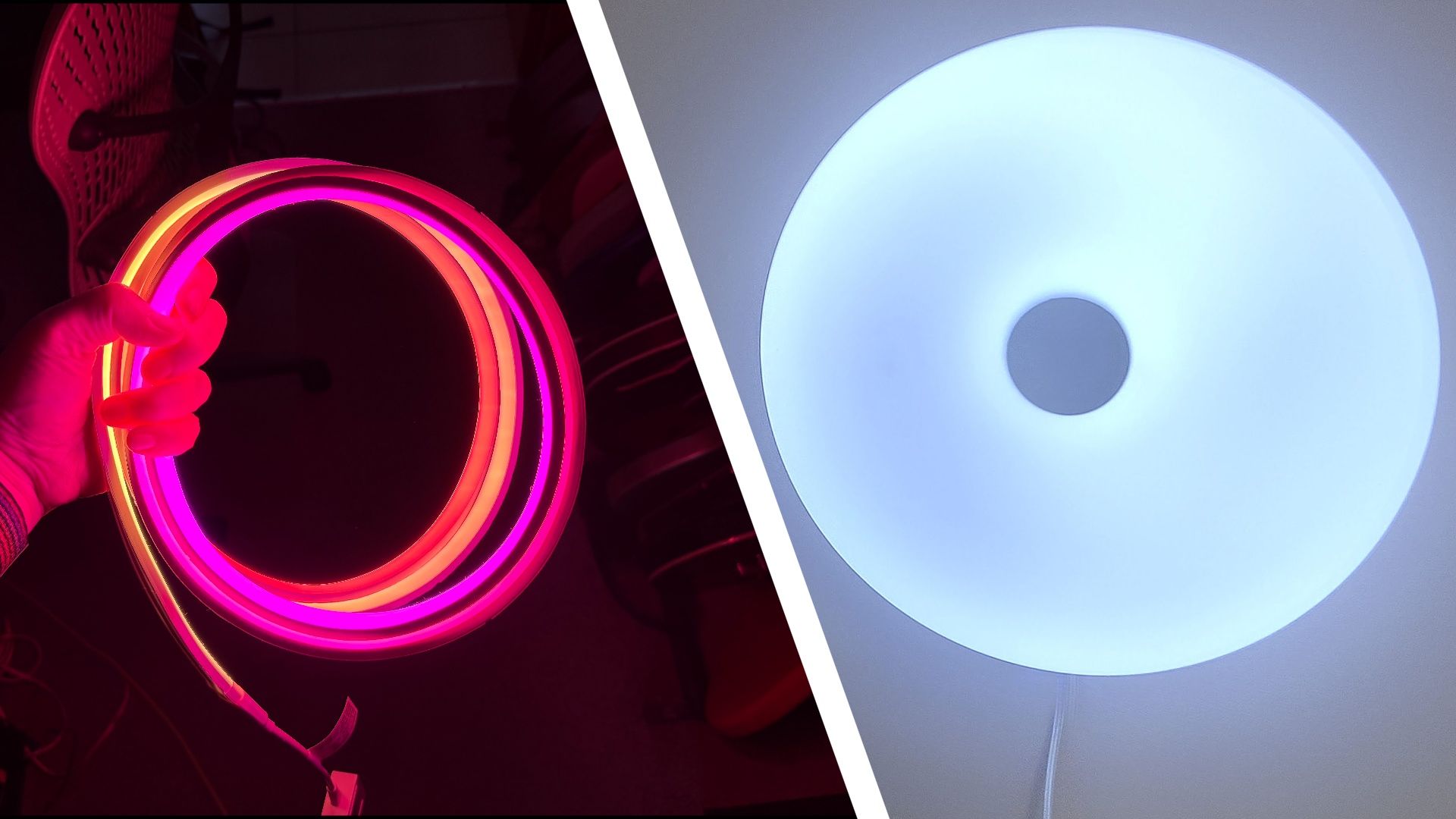
    The Varmblixt lamp is a particularly popular choice for smart lighting DIYers, who have discovered that its frosted glass case is ideal for concealing a Philips Hue light strip. Reddit user K1uppy described the process of opening the IKEA lamp, removing its innards, and replacing them with a coiled Hue strip.

    It’s an interesting idea, and another Redditor’s experiment with a non-Hue LED strip demonstrates how dramatic the effect could be with a gradient.

    However, you should remember that a coiled light strip could overheat, damaging the LEDs.

    4. Pick the right lamps

    A safer (though less imaginative) alternative is to use Hue bulbs with IKEA lamps designed for standard light bulbs. Look out for ones that will diffuse light, such as the Fado table lamp, the ruffled Vindkast, or the striking multi-bulb Simrishamn. You can use the Philips Hue app to create a ‘group’ of these three bulbs, and control them together or apply a scene so they co-ordinate for an interesting effect.

    There are Philips Hue bulbs for virtually all light fixtures, so you will be able to find one that fits your chosen IKEA lamp. Reddit users have suggested dialing down the brightness of your Hue bulbs to around 50% to create soft ambient lighting. You’ll find a collection of suitable IKEA pendant, table, and floor lamps below.

    Home IKEA Make Smart Home Smart Lights
    Follow on Google News Follow on Flipboard
    Share. Facebook Twitter Pinterest LinkedIn Tumblr Email Copy Link
    myappsplus
    • Website

    Related Posts

    ICYMI: the 7 biggest tech stories of the week, from AI apocalypse warnings to our Apple CEO interview

    September 19, 2026

    Weeks after building them, I’m still playing with Lego’s Smart Play Pokémon sets — they’re easily the best of 2026

    September 19, 2026

    After a month testing Bose’s new premium headphones, I would recommend them — but I’d recommend waiting more

    September 19, 2026
    Add A Comment
    Leave A Reply Cancel Reply

    Top Posts

    This tiny AI box could save me from upgrading my perfectly good laptop

    September 6, 20263 Views

    New Target ad delivers look at upcoming deals in one of Nintendo’s ‘largest promotions ever’

    September 13, 20262 Views

    Top 10 Best React Native App Development Companies in 2026

    September 12, 20262 Views
    Latest Reviews

    Amazon’s headphone sale is packed with deals from $19 — here are the 15 I’d buy

    myappsplusAugust 20, 2026

    China’s Military Says AI Can’t Replace Commanders. Xi Is Testing That

    myappsplusAugust 20, 2026

    EU Welcomes Apple’s App Store Changes, Epic Slams ‘Junk Fees’

    myappsplusAugust 20, 2026
    Stay In Touch
    • Facebook
    • YouTube
    • TikTok
    • WhatsApp
    • Twitter
    • Instagram

    Subscribe to Updates

    Get the latest tech news from FooBar about tech, design and biz.

    Most Popular

    Amazon’s headphone sale is packed with deals from $19 — here are the 15 I’d buy

    August 20, 20260 Views

    China’s Military Says AI Can’t Replace Commanders. Xi Is Testing That

    August 20, 20260 Views

    EU Welcomes Apple’s App Store Changes, Epic Slams ‘Junk Fees’

    August 20, 20260 Views
    Our Picks

    Google’s new ‘CC’ is an AI agent that helps families run their households

    September 19, 2026

    Google Gemini accessed protected systems of 3 real companies during artificial intelligence cybersecurity test

    September 19, 2026

    ICYMI: the 7 biggest tech stories of the week, from AI apocalypse warnings to our Apple CEO interview

    September 19, 2026

    Subscribe to Updates

    Subscribe to our newsletter and get the latest tech news, app updates, AI trends, smartphone reviews, and exclusive deals delivered straight to your inbox.

    Facebook X (Twitter) Instagram Pinterest
    • About Us
    • Get In Touch
    • Disclaimer
    • Privacy Policy
    • Terms & Conditions
    © 2026 MyAppsPlus. All Rights Reserved.

    Type above and press Enter to search. Press Esc to cancel.