Close Menu
MyAppsPlus

    Subscribe to Updates

    Get the latest creative news from FooBar about art, design and business.

    What's Hot

    Former TikTok execs built an app that uses AI to teach you how to pose for a photo

    September 15, 2026

    ‘The Orbi 373 immediately kicked my office Wi-Fi up a gear’: Netgear’s Wi-Fi 7 mesh 3-pack just hit a record low

    September 15, 2026

    Almost 8000 organizations hit by fake voicemail transcript emails in credential phishing attack

    September 15, 2026
    Facebook X (Twitter) Instagram
    Facebook X (Twitter) Instagram
    MyAppsPlusMyAppsPlus
    Tuesday, September 15
    • Home
    • Breaking Tech
    • Apps & Software
    • AI & Automation
    • Android
    • iPhone & iOS
    • More
      • Reviews
      • How-To Guides
      • Deals & Discounts
      • Shop
    MyAppsPlus
    Home»iPhone & iOS»Apple Card has three new and improved features in iOS 27
    iPhone & iOS

    Apple Card has three new and improved features in iOS 27

    myappsplusBy myappsplusSeptember 15, 2026003 Mins Read
    Share Facebook Twitter Pinterest Copy Link LinkedIn Tumblr Email Telegram WhatsApp
    Follow Us
    Google News Flipboard
    Apple Card has three new and improved features in iOS 27
    Share
    Facebook Twitter LinkedIn Pinterest Email Copy Link

    Apple Card gets even better in iOS 27, with new features like a recurring transactions section to help you stay on top of regular charges. Here’s what’s new.

    #1: Recurring transactions section
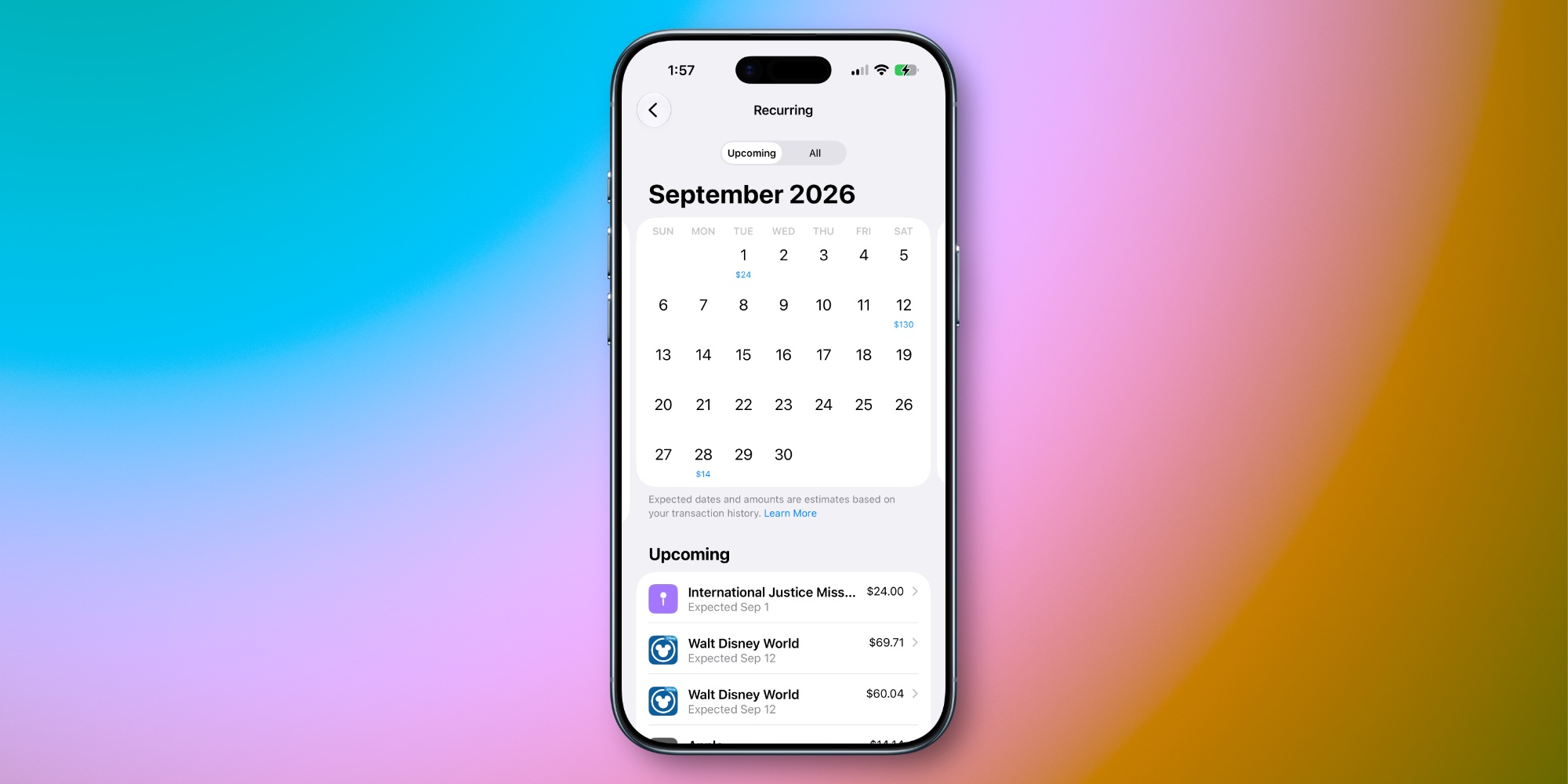

    iOS 27 adds a brand new ‘Recurring’ section to Apple Card in the Wallet app. You’ll find it inside the three-dot menu in the upper right corner when viewing your Apple Card.

    The Recurring section is a new go-to hub for seeing all Apple Card transactions that occur regularly.

    You can view recurring transactions on a calendar view by month, or see a chronological list of upcoming transactions.

    Apple explains how this works: “Dates and amounts shown are predicted based on your transaction history and may not be exact.” In my usage, the accuracy has been pretty spot-on.

    Plenty of services offer to help you gain awareness of all your subscriptions. And now, Apple Card can do that without you needing to share financial data with third parties.

    #2: Notifications for upcoming charges
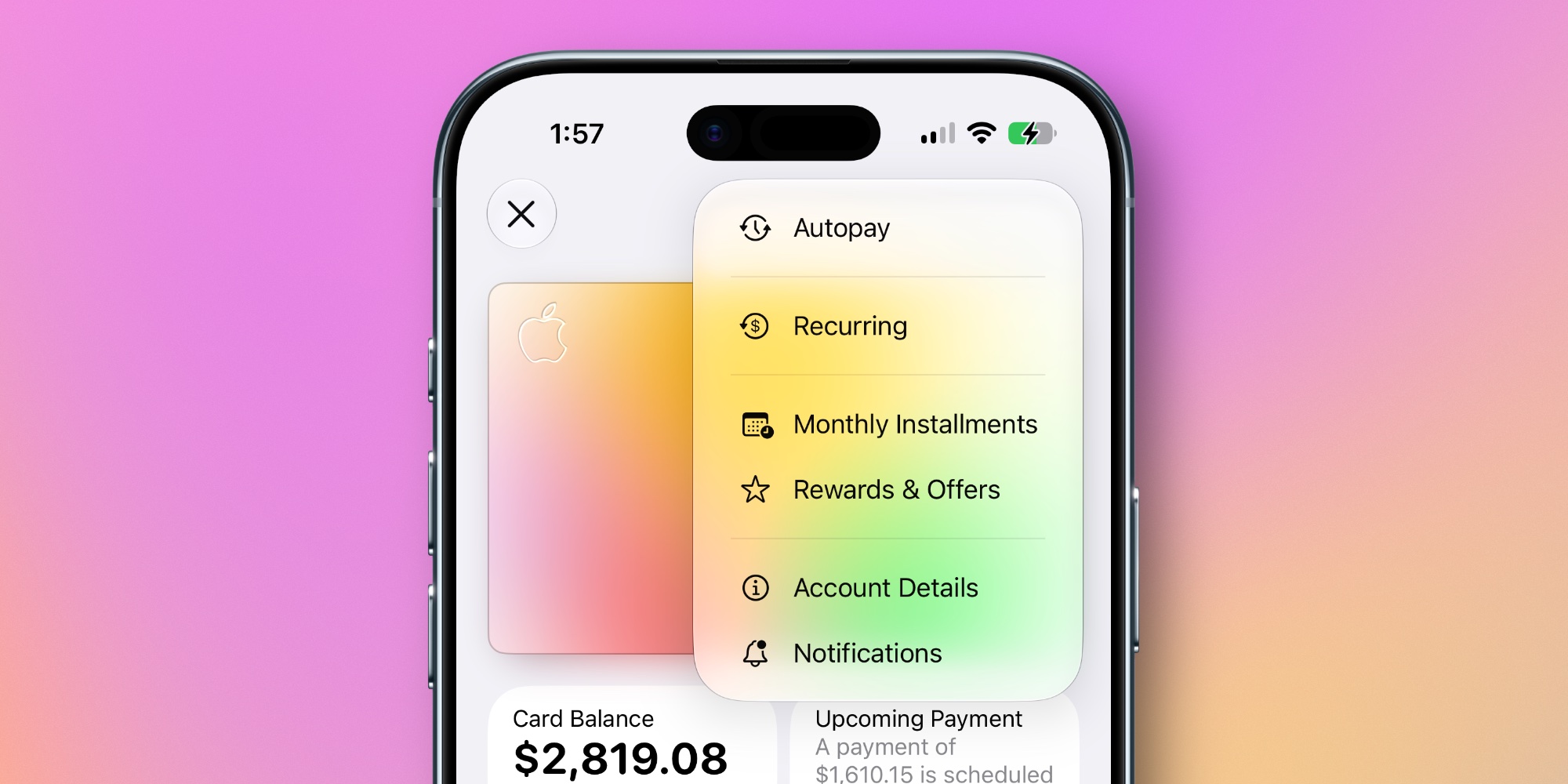

    Related to the new recurring transactions feature, iOS 27 adds a new type of notifications you can choose to enable or disable.

    When viewing your Apple Card, tap the ‘Notifications’ option inside the three-dot menu and you’ll see an addition: ‘Upcoming Transactions.’

    Based on your transaction history, Apple Card can predict when new recurring charges will go through and notify you ahead of time that they’re coming.

    It’s a convenient way to stay apprised of your spending and subscriptions. And if you don’t want those extra notifications, they’re easy to turn off.

    #3: Redesigned Apple Pay interface
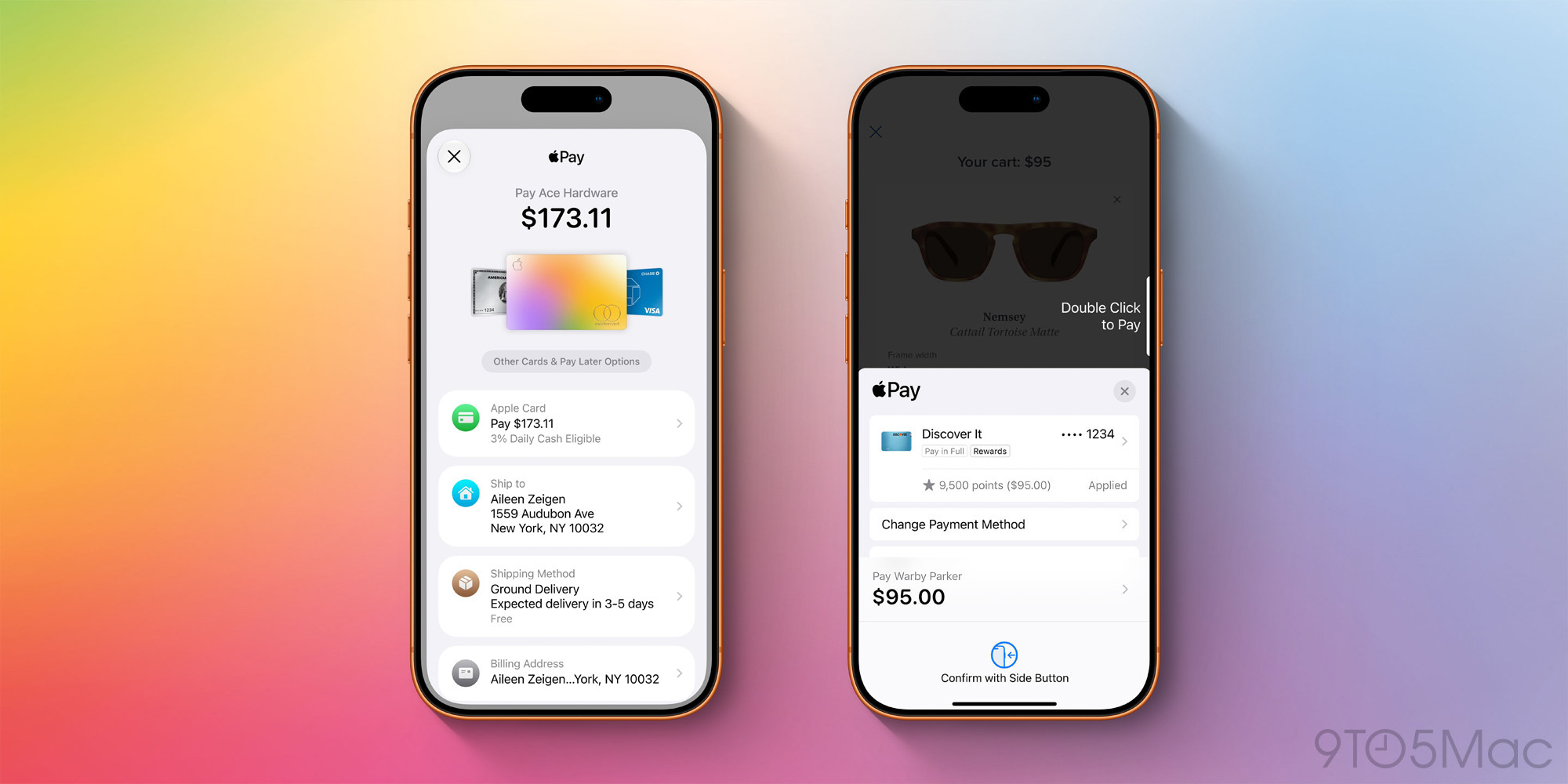
    iOS 27 (left) vs iOS 26 (right)

    Apple Card users will also benefit from the redesigned Apple Pay checkout UI in iOS 27.

    Any time you use Apple Pay on a website or in an app, you’ll now see a refreshed, better organized, more informative checkout screen.

    The new design makes it easy to check at a glance that details like shipping and billing addresses are all accurate. And if you decide not to use your Apple Card for a given transaction, switching between cards is now easier than ever too.

    Which Apple Card changes in iOS 27 are you most excited about? Let us know in the comments.

    *Buy iPhone with 15% discount from Apple refurbished

    Best iPhone accessories

    You’re reading 9to5Mac — experts who break news about Apple and its surrounding ecosystem, day after day. Be sure to check out our homepage for all the latest news, and follow 9to5Mac on Twitter, Facebook, and LinkedIn to stay in the loop. Don’t know where to start? Check out our exclusive stories, reviews, how-tos, and subscribe to our YouTube channel

    Apple Card improved News Three
    Follow on Google News Follow on Flipboard
    Share. Facebook Twitter Pinterest LinkedIn Tumblr Email Copy Link
    myappsplus
    • Website

    Related Posts

    Target announces big-time fall Prime Day competitor sale: Start time, bonus 15% off, more

    September 15, 2026

    Apple Watch Pre-Order Discounts Expand With Up to $20 In Savings

    September 15, 2026

    iOS 27 is finally here, with the new Siri AI beta – and 120 security patches

    September 15, 2026
    Add A Comment
    Leave A Reply Cancel Reply

    Top Posts

    The 6 AI-free Linux distros I recommend most

    August 19, 20264 Views

    AI, automation, robot dogs ensure on-site nuclear safety

    September 7, 20262 Views

    This tiny AI box could save me from upgrading my perfectly good laptop

    September 6, 20262 Views
    Latest Reviews

    New iOS 26 and macOS Tahoe updates fix 30 security vulnerabilities: what you need to know

    myappsplusAugust 18, 2026

    ICE agents can’t wear Meta glasses while they work, official memo warns

    myappsplusAugust 18, 2026

    Ubiquiti sued by Ukrainian families over claims its tech powered Russian battlefield drones

    myappsplusAugust 18, 2026
    Stay In Touch
    • Facebook
    • YouTube
    • TikTok
    • WhatsApp
    • Twitter
    • Instagram

    Subscribe to Updates

    Get the latest tech news from FooBar about tech, design and biz.

    Most Popular

    New iOS 26 and macOS Tahoe updates fix 30 security vulnerabilities: what you need to know

    August 18, 20260 Views

    ICE agents can’t wear Meta glasses while they work, official memo warns

    August 18, 20260 Views

    Ubiquiti sued by Ukrainian families over claims its tech powered Russian battlefield drones

    August 18, 20260 Views
    Our Picks

    Former TikTok execs built an app that uses AI to teach you how to pose for a photo

    September 15, 2026

    ‘The Orbi 373 immediately kicked my office Wi-Fi up a gear’: Netgear’s Wi-Fi 7 mesh 3-pack just hit a record low

    September 15, 2026

    Almost 8000 organizations hit by fake voicemail transcript emails in credential phishing attack

    September 15, 2026

    Subscribe to Updates

    Subscribe to our newsletter and get the latest tech news, app updates, AI trends, smartphone reviews, and exclusive deals delivered straight to your inbox.

    Facebook X (Twitter) Instagram Pinterest
    • About Us
    • Get In Touch
    • Disclaimer
    • Privacy Policy
    • Terms & Conditions
    © 2026 MyAppsPlus. All Rights Reserved.

    Type above and press Enter to search. Press Esc to cancel.