Close Menu
MyAppsPlus

    Subscribe to Updates

    Get the latest creative news from FooBar about art, design and business.

    What's Hot

    Wired vs wireless gaming mouse: is there really a difference in performance?

    September 15, 2026

    Here’s what’s new with parental control features in iOS 27

    September 15, 2026

    This bold, anime-themed MelGeek Centauri60 keyboard just became my daily driver — here’s why

    September 15, 2026
    Facebook X (Twitter) Instagram
    Facebook X (Twitter) Instagram
    MyAppsPlusMyAppsPlus
    Tuesday, September 15
    • Home
    • Breaking Tech
    • Apps & Software
    • AI & Automation
    • Android
    • iPhone & iOS
    • More
      • Reviews
      • How-To Guides
      • Deals & Discounts
      • Shop
    MyAppsPlus
    Home»iPhone & iOS»Here’s what’s new with parental control features in iOS 27
    iPhone & iOS

    Here’s what’s new with parental control features in iOS 27

    myappsplusBy myappsplusSeptember 15, 2026004 Mins Read
    Share Facebook Twitter Pinterest Copy Link LinkedIn Tumblr Email Telegram WhatsApp
    Follow Us
    Google News Flipboard
    Here’s what’s new with parental control features in iOS 27
    Share
    Facebook Twitter LinkedIn Pinterest Email Copy Link

    Included in today’s 2027 system updates from Apple are several new Screen Time and parental control features aimed at giving parents more control over how their kids use their devices. Here are the details.

    Today’s updates include important parental control improvements

    Apple today released iOS 27, iPadOS 27, and macOS 27 with what it describes as a “new suite of powerful, intuitive, and easy-to-use tools that helps parents create safer digital experiences for their kids,” many of which the company previewed in June, during the WWDC26 keynote.

    In essence, the new features focus on four areas: what content kids can access, who they can communicate with, when they can use their devices, and how parents can manage those controls.

    All of them fall under the protections and restrictions of Child Accounts, which Apple says are required for children under 13, or the equivalent minimum age in their country or region, and available for children up to 18.

    With iOS 27, Apple has also simplified the setup process for new Child Accounts. Parents can start with a small set of essential apps, a recommended starter set, or choose exactly which Apple apps their child can access from the outset.

    Once a parent sets up a Child Account, they can choose which apps and websites their child can access, as well as set age and content restrictions for movies, TV shows, music, books, and other media.

    Parents can now also rely on Ask to Browse, a feature that lets kids request access to blocked websites in Safari across iPhone, iPad, and Mac, with parents approving requests in Messages. This is similar to Ask to Buy, which already requires parental approval before children can download apps or make in-app purchases.
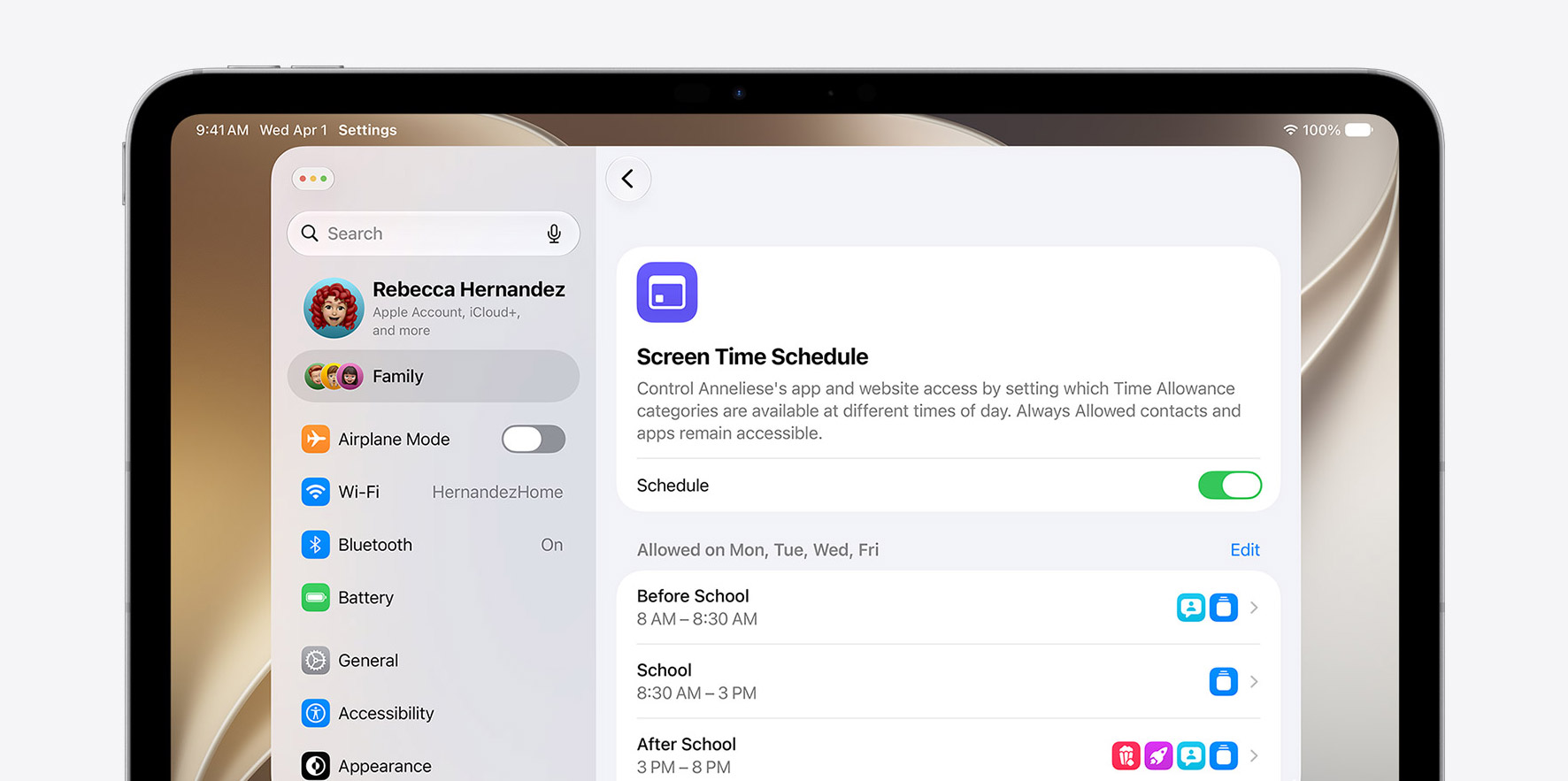

    Parents can also require kids to ask for approval before connecting with new contacts, set shared or individual daily limits for categories such as Entertainment, Games, and Social Media, and create schedules that determine which apps are available at different times of day. Those schedules can also vary depending on the day of the week.

    Screen Time itself has also been redesigned, with a new architecture that Apple says makes parental controls sync more quickly across devices in a Family Sharing group. Parents can now see weekly usage summaries and their kids’ most-used apps at a glance, temporarily pause access to a device, open things back up for a limited period, and quickly switch between different schedules.

    Communication Safety is also expanding beyond nudity detection. The feature can now block detected gore or violent content in shared images and videos, while displaying a warning and additional resources.

    Time Allowances are also more flexible. Parents can create their own app categories, move apps between them, and assign a time allowance as soon as they approve a new app through Ask to Buy. Websites associated with an app can also automatically follow the same allowance.

    Apple says its suggested Time Allowances are based on a child’s age and expert research. The company is also working with the American Academy of Pediatrics to adapt its Family Media Plan into guidance for parents using Apple products.

    Finally, Apple notes that all devices in a Family Sharing group need to be running the version 27 software releases to use the new Screen Time experience.

    To learn more about what’s new with parental controls, follow this link.

    Worth checking out on Amazon

    You’re reading 9to5Mac — experts who break news about Apple and its surrounding ecosystem, day after day. Be sure to check out our homepage for all the latest news, and follow 9to5Mac on Twitter, Facebook, and LinkedIn to stay in the loop. Don’t know where to start? Check out our exclusive stories, reviews, how-tos, and subscribe to our YouTube channel

    control Heres News parental Whats
    Follow on Google News Follow on Flipboard
    Share. Facebook Twitter Pinterest LinkedIn Tumblr Email Copy Link
    myappsplus
    • Website

    Related Posts

    Widow’s Bay sweeps 78th Primetime Emmy Awards as Apple TV scores 9 more wins

    September 15, 2026

    iOS 27 Features: The Ultimate Mega Guide

    September 15, 2026

    The world’s first phone with three 200MP cameras gets a launch date

    September 15, 2026
    Add A Comment
    Leave A Reply Cancel Reply

    Top Posts

    The 6 AI-free Linux distros I recommend most

    August 19, 20264 Views

    AI, automation, robot dogs ensure on-site nuclear safety

    September 7, 20262 Views

    This tiny AI box could save me from upgrading my perfectly good laptop

    September 6, 20262 Views
    Latest Reviews

    New iOS 26 and macOS Tahoe updates fix 30 security vulnerabilities: what you need to know

    myappsplusAugust 18, 2026

    ICE agents can’t wear Meta glasses while they work, official memo warns

    myappsplusAugust 18, 2026

    Ubiquiti sued by Ukrainian families over claims its tech powered Russian battlefield drones

    myappsplusAugust 18, 2026
    Stay In Touch
    • Facebook
    • YouTube
    • TikTok
    • WhatsApp
    • Twitter
    • Instagram

    Subscribe to Updates

    Get the latest tech news from FooBar about tech, design and biz.

    Most Popular

    New iOS 26 and macOS Tahoe updates fix 30 security vulnerabilities: what you need to know

    August 18, 20260 Views

    ICE agents can’t wear Meta glasses while they work, official memo warns

    August 18, 20260 Views

    Ubiquiti sued by Ukrainian families over claims its tech powered Russian battlefield drones

    August 18, 20260 Views
    Our Picks

    Wired vs wireless gaming mouse: is there really a difference in performance?

    September 15, 2026

    Here’s what’s new with parental control features in iOS 27

    September 15, 2026

    This bold, anime-themed MelGeek Centauri60 keyboard just became my daily driver — here’s why

    September 15, 2026

    Subscribe to Updates

    Subscribe to our newsletter and get the latest tech news, app updates, AI trends, smartphone reviews, and exclusive deals delivered straight to your inbox.

    Facebook X (Twitter) Instagram Pinterest
    • About Us
    • Get In Touch
    • Disclaimer
    • Privacy Policy
    • Terms & Conditions
    © 2026 MyAppsPlus. All Rights Reserved.

    Type above and press Enter to search. Press Esc to cancel.