
Close Menu
MyAppsPlus

    Subscribe to Updates

    Get the latest creative news from FooBar about art, design and business.

    What's Hot

    A Diablo 5 new class has already been revealed with the Plague Knight being ‘a walking death’ across the battlefield — while two returning classes have also been confirmed

    September 13, 2026

    This Galaxy Z Fold 8 Ultra rival could soon reach global markets

    September 13, 2026

    Affordably upgrade oral hygiene with this Philips Sonicare 1100 electric toothbrush at $15

    September 13, 2026
    Facebook X (Twitter) Instagram
    Facebook X (Twitter) Instagram
    MyAppsPlusMyAppsPlus
    Sunday, September 13
    • Home
    • Breaking Tech
    • Apps & Software
    • AI & Automation
    • Android
    • iPhone & iOS
    • More
      • Reviews
      • How-To Guides
      • Deals & Discounts
      • Shop
    MyAppsPlus
    Home»Breaking Tech»What is the difference between a dead pixel and a stuck pixel?
    Breaking Tech

    What is the difference between a dead pixel and a stuck pixel?

    myappsplusBy myappsplusSeptember 13, 2026003 Mins Read
    Share Facebook Twitter Pinterest Copy Link LinkedIn Tumblr Email Telegram WhatsApp
    Follow Us
    Google News Flipboard
    What is the difference between a dead pixel and a stuck pixel?
    Share
    Facebook Twitter LinkedIn Pinterest Email Copy Link

    Look closely and you can tell them apart.

    Many electronics users have felt the wave of panic that comes with trying to wipe away a mark on their screen, only to realize it’s actually an issue with the screen itself. Sometimes, this can be caused by factors likeever, it’s a pixel problem, which can be much more dread-inducing due to varying levels of repairability

    Even the best monitors aren’t safe from a potential pixel issue, of which there are two main types: stuck pixels and dead pixels. Both are dots — or, even worse, clusters of dots — that no screen user wants to see. However, though both screen annoyances look a lot alike shape-wise, there are some distinct differences between them, namely in their exact appearance and if they can be fixed.

    Spotting the difference

    One of the biggest differences between a stuck and dead pixel is the presence of light. A stuck pixel is permanently on, displaying a constant blue, red, green or bright point, while a dead pixel is, as the name suggests, no longer functioning and is always black. This visual difference can help you determine which particular problem you’re facing.

    The other main defining factor between the two is how fixable they are. A stuck pixel has a myriad of troubleshooting routes that can be taken, and can often be returned to normal. A dead pixel, on the other hand, cannot be salvaged. If you’ve got a dead pixel, you’ll unfortunately either have to get a replacement or learn to tolerate it. On the bright side, it’s a generally less obtrusive visual issue than something like screen burn-in.

    How to test for dead and stuck pixels
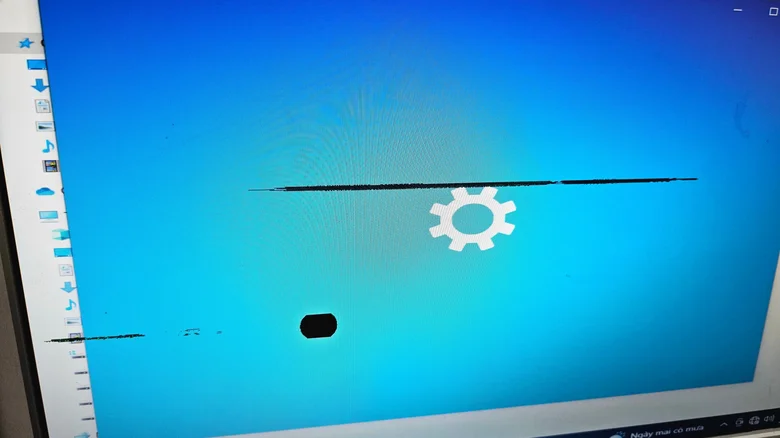
    A computer screen with many clusters of dead pixels

    Stuck and dead pixels are so small it can sometimes be tricky to identify if they’re even the issue at hand, and, if they are, which instance in particular you’re dealing with. First, it’s best to rule out all other display issues that could be going on. Clean your display thoroughly, see if the problem persists across different applications and, if you can, try both a new cable and input device.

    Once you’ve ruled out other problems, conduct a final test designed to concretely pinpoint the issue. There are several sites and apps that can be used to sniff out pixel problems, like Dead Pixel Buddy, and even some that purport the potential to solve the issue as well, like JScreenFix or Dead Pixels Test and Fix. It should be noted that stuck pixels can sometimes be harder to diagnose, as those with power or heat problems as the underlying cause may only appear intermittently. If that’s the case, try to pull up one of these tests as soon as you notice the issue’s returned.

    between Computing Dead difference What
    Follow on Google News Follow on Flipboard
    Share. Facebook Twitter Pinterest LinkedIn Tumblr Email Copy Link
    myappsplus
    • Website

    Related Posts

    How to get started with Meta’s new AI agent, Muse

    September 13, 2026

    How to properly clean and sanitize your secondhand tech finds

    September 13, 2026

    Are you using the right Ethernet port on your router? Here’s how to know

    September 13, 2026
    Add A Comment
    Leave A Reply Cancel Reply

    Top Posts

    The 6 AI-free Linux distros I recommend most

    August 19, 20264 Views

    AI, automation, robot dogs ensure on-site nuclear safety

    September 7, 20262 Views

    This tiny AI box could save me from upgrading my perfectly good laptop

    September 6, 20262 Views
    Latest Reviews

    Why Fluper is the No.1 Mobile App Development Company in the UAE, Saudi Arabia, and the Middle East.

    myappsplusAugust 18, 2026

    How New Kuwait And Indonesia Tech Deals At Baker Hughes (BKR) Have Changed Its Investment Story

    myappsplusAugust 18, 2026

    Google is reportedly planning to move all Pixel production out of China

    myappsplusAugust 18, 2026
    Stay In Touch
    • Facebook
    • YouTube
    • TikTok
    • WhatsApp
    • Twitter
    • Instagram

    Subscribe to Updates

    Get the latest tech news from FooBar about tech, design and biz.

    Most Popular

    Why Fluper is the No.1 Mobile App Development Company in the UAE, Saudi Arabia, and the Middle East.

    August 18, 20260 Views

    How New Kuwait And Indonesia Tech Deals At Baker Hughes (BKR) Have Changed Its Investment Story

    August 18, 20260 Views

    Google is reportedly planning to move all Pixel production out of China

    August 18, 20260 Views
    Our Picks

    A Diablo 5 new class has already been revealed with the Plague Knight being ‘a walking death’ across the battlefield — while two returning classes have also been confirmed

    September 13, 2026

    This Galaxy Z Fold 8 Ultra rival could soon reach global markets

    September 13, 2026

    Affordably upgrade oral hygiene with this Philips Sonicare 1100 electric toothbrush at $15

    September 13, 2026

    Subscribe to Updates

    Subscribe to our newsletter and get the latest tech news, app updates, AI trends, smartphone reviews, and exclusive deals delivered straight to your inbox.

    Facebook X (Twitter) Instagram Pinterest
    • About Us
    • Get In Touch
    • Disclaimer
    • Privacy Policy
    • Terms & Conditions
    © 2026 MyAppsPlus. All Rights Reserved.

    Type above and press Enter to search. Press Esc to cancel.