Close Menu
MyAppsPlus

    Subscribe to Updates

    Get the latest creative news from FooBar about art, design and business.

    What's Hot

    Dario Amodei — We Must Pace the Frontier

    September 14, 2026

    iOS 27 release date: When is it coming to your iPhone

    September 14, 2026

    Sony denies claims it is stopping disc production — but admits its last plant will drop production by 10%

    September 14, 2026
    Facebook X (Twitter) Instagram
    Facebook X (Twitter) Instagram
    MyAppsPlusMyAppsPlus
    Monday, September 14
    • Home
    • Breaking Tech
    • Apps & Software
    • AI & Automation
    • Android
    • iPhone & iOS
    • More
      • Reviews
      • How-To Guides
      • Deals & Discounts
      • Shop
    MyAppsPlus
    Home»Breaking Tech»How to share your iPhone’s location for just as long as you need
    Breaking Tech

    How to share your iPhone’s location for just as long as you need

    myappsplusBy myappsplusSeptember 12, 2026004 Mins Read
    Share Facebook Twitter Pinterest Copy Link LinkedIn Tumblr Email Telegram WhatsApp
    Follow Us
    Google News Flipboard
    How to share your iPhone’s location for just as long as you need
    Share
    Facebook Twitter LinkedIn Pinterest Email Copy Link

    Find My’s expanded location sharing options give you more flexibility.

    iOS 27 upgrades your <a href="https://myappsplus.com/internet-accuses-apple-of-photoshop-in-iphone-duo-ads/” title=”Internet Accuses Apple of Photoshop in iPhone Duo Ads”>iPhone with tons of improvements to Apple Intelligence, Siri, child safety, accessibility, Maps and more. You’ll also notice a few minor upgrades for the Find My app, including the option to share your location for a temporary period rather than all the time.

    Say you’re traveling with friends, but have made plans for everyone to do their own thing one afternoon. Fine-tuned location sharing lets you keep everyone updated on where you are without worrying about having to turn off the setting after your trip. Or perhaps you’re going on a blind date and you’d feel better if your roommate could track your location for peace of mind.

    This option has been available in iOS for some time, but it’s even more customizable now. When an hour is too short but permanent sharing is too long, you have more options.

    Set your custom sharing timeframe
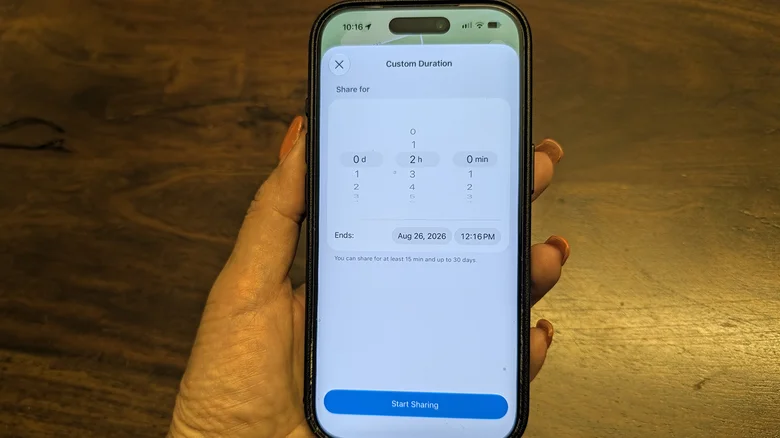
    A hand holding an iPhone showing a custom duration for sharing your location with someone in Find My.

    Christine Persaud for Engadget

    In iOS 26 and prior, you could choose to share your location with someone in Find My for an hour, a day or indefinitely. Now, there’s the option to share for a few days (like the duration of a trip), only a few hours (like while you’re at dinner and the babysitter is on shift), or even just for 15 minutes. 

    The options appear as For One Hour, For Today, Always or Custom. If you select Custom, you can use rolling dials to choose by days (from one up to 30), hours (1 to 23), or minutes (1 to 59). Or if you prefer, this panel also has the option to pick a specific end date and time so you don’t have to calculate manually. 

    The minimum amount of time for sharing is 15 minutes. However, you can select any variation of those times, like 1.5 hours or even one day, three hours and five minutes if you want to be precise. This means you don’t have to worry about resetting the sharing location every day for a week while on vacation — or conversely, forgetting to turn it off after you’ve set it to indefinite.

    As soon as you share your location, the person can tap your name on their People list in Find My to see exactly where you are. Once the time elapses, they’ll no longer be able to see your location.

    You can temporarily hide your location, too
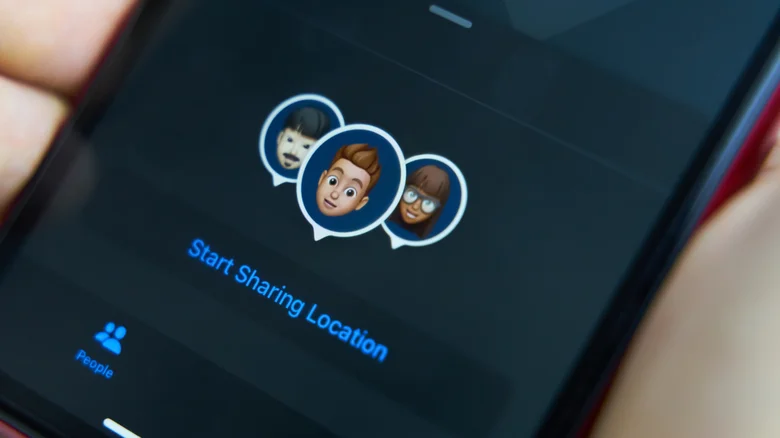
    A close-up of an iPhone screen showing sharing location with people.

    Another new Find My feature in iOS 27, which you can already use if you’ve installed the iOS 27 beta, is the option to temporarily hide your location from someone with whom you share location indefinitely. Maybe you might want to hide where you are before you pop into a local bakery or flower shop to treat your love so they aren’t alerted ahead of time. Perhaps you plan to visit your best friend who doesn’t know you’ve flown into town. Surprise parties are another obvious use case.

    If you always share your location with someone, like a spouse or child, you can hit Hide Location to pause sharing. They won’t know you’ve done this; they’ll just see that your location can’t be found if they check. Pausing is more convenient than removing sharing settings and having to re-add them later.

    If you want to try these features now, you can do so by downloading the iOS 27 public beta ahead of the official release. But keep in mind you may have to deal with a buggy experience until the kinks are worked out: betas are the testing phase for those willing to participate. If you decide to go ahead, make sure to back up your iPhone first as a precautionary measure.

    Apple iPhones location share Your
    Follow on Google News Follow on Flipboard
    Share. Facebook Twitter Pinterest LinkedIn Tumblr Email Copy Link
    myappsplus
    • Website

    Related Posts

    iOS 27 release date: When is it coming to your iPhone

    September 14, 2026

    Anthropic’s CEO wants the industry to slow down

    September 14, 2026

    MagSafe vs. USB-C: Which is better for charging your MacBook?

    September 14, 2026
    Add A Comment
    Leave A Reply Cancel Reply

    Top Posts

    The 6 AI-free Linux distros I recommend most

    August 19, 20264 Views

    AI, automation, robot dogs ensure on-site nuclear safety

    September 7, 20262 Views

    This tiny AI box could save me from upgrading my perfectly good laptop

    September 6, 20262 Views
    Latest Reviews

    Why Fluper is the No.1 Mobile App Development Company in the UAE, Saudi Arabia, and the Middle East.

    myappsplusAugust 18, 2026

    How New Kuwait And Indonesia Tech Deals At Baker Hughes (BKR) Have Changed Its Investment Story

    myappsplusAugust 18, 2026

    Google is reportedly planning to move all Pixel production out of China

    myappsplusAugust 18, 2026
    Stay In Touch
    • Facebook
    • YouTube
    • TikTok
    • WhatsApp
    • Twitter
    • Instagram

    Subscribe to Updates

    Get the latest tech news from FooBar about tech, design and biz.

    Most Popular

    Why Fluper is the No.1 Mobile App Development Company in the UAE, Saudi Arabia, and the Middle East.

    August 18, 20260 Views

    How New Kuwait And Indonesia Tech Deals At Baker Hughes (BKR) Have Changed Its Investment Story

    August 18, 20260 Views

    Google is reportedly planning to move all Pixel production out of China

    August 18, 20260 Views
    Our Picks

    Dario Amodei — We Must Pace the Frontier

    September 14, 2026

    iOS 27 release date: When is it coming to your iPhone

    September 14, 2026

    Sony denies claims it is stopping disc production — but admits its last plant will drop production by 10%

    September 14, 2026

    Subscribe to Updates

    Subscribe to our newsletter and get the latest tech news, app updates, AI trends, smartphone reviews, and exclusive deals delivered straight to your inbox.

    Facebook X (Twitter) Instagram Pinterest
    • About Us
    • Get In Touch
    • Disclaimer
    • Privacy Policy
    • Terms & Conditions
    © 2026 MyAppsPlus. All Rights Reserved.

    Type above and press Enter to search. Press Esc to cancel.