Close Menu
MyAppsPlus

    Subscribe to Updates

    Get the latest creative news from FooBar about art, design and business.

    What's Hot

    How to watch Rangers vs Celtic for FREE: Live streams and TV channels for Scottish League Cup 2026/27 quarter-final

    September 13, 2026

    Giant Nintendo Sale now live from $7: Loads of Switch games, amiibo, Alarmo, controllers, more

    September 13, 2026

    3 best psychological thriller movies on Prime Video you (probably) haven’t seen

    September 13, 2026
    Facebook X (Twitter) Instagram
    Facebook X (Twitter) Instagram
    MyAppsPlusMyAppsPlus
    Sunday, September 13
    • Home
    • Breaking Tech
    • Apps & Software
    • AI & Automation
    • Android
    • iPhone & iOS
    • More
      • Reviews
      • How-To Guides
      • Deals & Discounts
      • Shop
    MyAppsPlus
    Home»Reviews»I tried Lenovo’s Project Swan and its expanding screen might finally kill the portable monitor
    Reviews

    I tried Lenovo’s Project Swan and its expanding screen might finally kill the portable monitor

    myappsplusBy myappsplusSeptember 5, 2026004 Mins Read
    Share Facebook Twitter Pinterest Copy Link LinkedIn Tumblr Email Telegram WhatsApp
    Follow Us
    Google News Flipboard
    I tried Lenovo’s Project Swan and its expanding screen might finally kill the portable monitor
    Share
    Facebook Twitter LinkedIn Pinterest Email Copy Link

    Despite how hard I try, I always end up bringing too many gadgets when I travel. With a transforming device like Lenovo’s new Project Swan, though, those days may be done for good.

    Alongside one of the best laptops, I often pack a portable monitor for those times when I need extra screen real estate. This setup has served me well in the past, but between chargers, power banks, and cables, my tech bag gets unwieldy fast. In fact, on my last trip to Taiwan for Computex, my carry-on ended up weighing more than my checked bag.

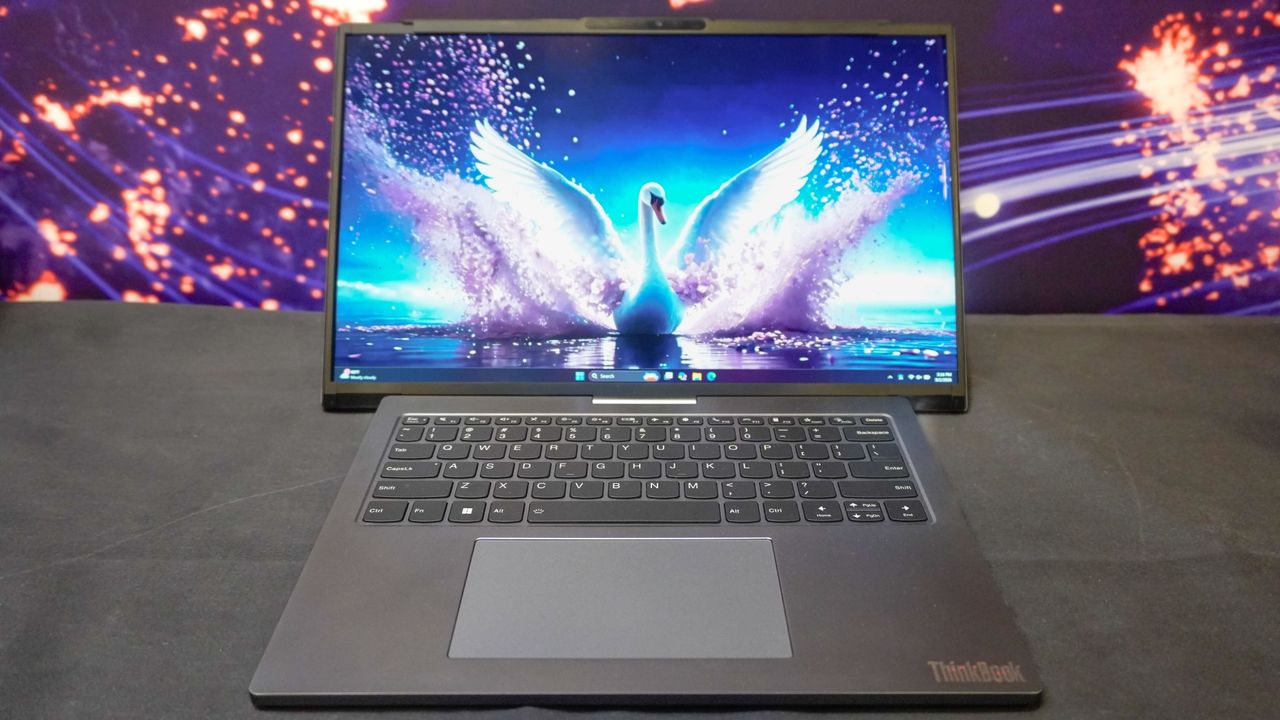
    At IFA 2026, Lenovo unveiled two new concept laptops. While Project AeroBlade was remarkably thin and light, Project Swan transforms from a compact 14-inch laptop into a 17-inch workstation with the push of a button. We saw a similar horizontal expansion mechanic with the company’s Legion Pro Rollable concept back at CES, but that machine was built strictly for gaming.

    Now, Lenovo is taking that same core idea — using a streamlined motor array — and tailoring it to a business laptop. Here is everything you need to know about Project Swan, and why it could mark the end of portable monitors (if you’re willing to pay up, of course).

    Wider but not unwieldy

    With its screen retracted, Project Swan looks like a standard, highly portable 14-inch notebook weighing about 3.5 pounds. While that’s slightly on the heavy side for a 14-inch laptop, keep in mind that this is a concept — and having it in your bag means leaving a secondary display at home.

    The idea is to give mobile power users a workspace that expands only when required. You can comfortably use the 14-inch screen on a cramped airplane tray table, then expand the display once you get to your hotel desk or a coffee shop.

    While full internal specs haven’t been released yet, the physical layout includes two side-mounted USB-C ports and a headphone jack. A rear USB-C port handles charging, flanked by a tiny LED status indicator. Despite housing a rolling screen assembly, the chassis stays surprisingly trim at 17.9mm (0.7 inches).

    As with the AeroBlade concept, you get Lenovo’s signature keyboard with generous key travel, paired with a spacious trackpad. Toggling between retracted and expanded modes is effortless: just tap the Insert key, and the laptop’s motors handle the rest.

    Fully extended, the display rolls out into a wider 16:9 layout. That extra horizontal space is built for running two full apps side-by-side. As someone who writes with dual windows open, even on a 16-inch MacBook Pro, that added horizontal space would make an immediate difference.

    The second screen’s swan song?

    I still catch myself wishing Project Swan rolled out even further. As someone who uses an ultrawide monitor at home, stretching out to a full 21:9 aspect ratio to fit two uncompressed, full-sized browser windows side-by-side would be the dream.

    Even as a 16:9 expansion, having a single laptop that stretches on demand feels like the ideal solution for business travelers who hate setting up an external monitor. I’ve tried solving this issue with display glasses connected to a mini PC, but even a pair of the best smart glasses can lead to eye fatigue over a long workday.

    Although Project Swan is technically a concept right now, I wouldn’t be surprised to see a retail version hit the market relatively soon. Unlike companies that showcase flashy concepts never meant for production, Lenovo actually ships them. Case in point: their vertical rollable concept at CES eventually made its way to store shelves as the ThinkBook Plus Gen 6 Rollable.

    If Project Swan makes the jump to a retail product, it will undoubtedly carry a steep price tag. But for business travelers who want maximum screen real estate without pulling extra gear out of their bag at airport security, it might be worth every penny.

    • Best of IFA 2026: We found the 26 top new gadgets
    • This tiny AI box could save me from upgrading my perfectly good laptop
    • Best laptops of IFA 2026: Wild colors, ultrathin designs and rollable displays
    Computing Peripherals Laptops Lenovos Project tried
    Follow on Google News Follow on Flipboard
    Share. Facebook Twitter Pinterest LinkedIn Tumblr Email Copy Link
    myappsplus
    • Website

    Related Posts

    How to watch Rangers vs Celtic for FREE: Live streams and TV channels for Scottish League Cup 2026/27 quarter-final

    September 13, 2026

    3 best psychological thriller movies on Prime Video you (probably) haven’t seen

    September 13, 2026

    Google Health’s mistakes are a grave warning for Apple’s new AI-powered Health app

    September 13, 2026
    Add A Comment
    Leave A Reply Cancel Reply

    Top Posts

    The 6 AI-free Linux distros I recommend most

    August 19, 20264 Views

    AI, automation, robot dogs ensure on-site nuclear safety

    September 7, 20262 Views

    This tiny AI box could save me from upgrading my perfectly good laptop

    September 6, 20262 Views
    Latest Reviews

    Why Fluper is the No.1 Mobile App Development Company in the UAE, Saudi Arabia, and the Middle East.

    myappsplusAugust 18, 2026

    How New Kuwait And Indonesia Tech Deals At Baker Hughes (BKR) Have Changed Its Investment Story

    myappsplusAugust 18, 2026

    Google is reportedly planning to move all Pixel production out of China

    myappsplusAugust 18, 2026
    Stay In Touch
    • Facebook
    • YouTube
    • TikTok
    • WhatsApp
    • Twitter
    • Instagram

    Subscribe to Updates

    Get the latest tech news from FooBar about tech, design and biz.

    Most Popular

    Why Fluper is the No.1 Mobile App Development Company in the UAE, Saudi Arabia, and the Middle East.

    August 18, 20260 Views

    How New Kuwait And Indonesia Tech Deals At Baker Hughes (BKR) Have Changed Its Investment Story

    August 18, 20260 Views

    Google is reportedly planning to move all Pixel production out of China

    August 18, 20260 Views
    Our Picks

    How to watch Rangers vs Celtic for FREE: Live streams and TV channels for Scottish League Cup 2026/27 quarter-final

    September 13, 2026

    Giant Nintendo Sale now live from $7: Loads of Switch games, amiibo, Alarmo, controllers, more

    September 13, 2026

    3 best psychological thriller movies on Prime Video you (probably) haven’t seen

    September 13, 2026

    Subscribe to Updates

    Subscribe to our newsletter and get the latest tech news, app updates, AI trends, smartphone reviews, and exclusive deals delivered straight to your inbox.

    Facebook X (Twitter) Instagram Pinterest
    • About Us
    • Get In Touch
    • Disclaimer
    • Privacy Policy
    • Terms & Conditions
    © 2026 MyAppsPlus. All Rights Reserved.

    Type above and press Enter to search. Press Esc to cancel.