Close Menu
MyAppsPlus

    Subscribe to Updates

    Get the latest creative news from FooBar about art, design and business.

    What's Hot

    iOS 27 Release Date: What Apple Confirmed for September 14

    September 13, 2026

    3 Netflix movies to watch if you loved ‘Why Did I Get Married Again?’ (and no, they’re not ALL Tyler Perry movies)

    September 13, 2026

    Parents face extra bus fees over smartphone stance

    September 13, 2026
    Facebook X (Twitter) Instagram
    Facebook X (Twitter) Instagram
    MyAppsPlusMyAppsPlus
    Sunday, September 13
    • Home
    • Breaking Tech
    • Apps & Software
    • AI & Automation
    • Android
    • iPhone & iOS
    • More
      • Reviews
      • How-To Guides
      • Deals & Discounts
      • Shop
    MyAppsPlus
    Home»Breaking Tech»How to improve your audio quality on Android Auto
    Breaking Tech

    How to improve your audio quality on Android Auto

    myappsplusBy myappsplusAugust 30, 2026004 Mins Read
    Share Facebook Twitter Pinterest Copy Link LinkedIn Tumblr Email Telegram WhatsApp
    Follow Us
    Google News Flipboard
    How to improve your audio quality on Android Auto
    Share
    Facebook Twitter LinkedIn Pinterest Email Copy Link

    There are several things you should check.

    If you already have a perfectly functional cable that supports Android Auto, upgrading to a 5Gbps cable isn’t going to make Spotify sound like you rebuilt the stereo. Yes, a broken or poorly built cable can lead to dropouts, disconnects and other frustrations, but additional bandwidth won’t improve an intact digital audio stream.

    Google does recommend trying a high-quality or replacement cable when wired Android Auto is acting up, but that’s basic troubleshooting, not some secret hi-fi upgrade. If you already have a stable connection, the best places to look for improvement are in the music, any processing your phone or app is doing and finally the car’s audio settings.

    Don’t blame Android Auto first — Check the music app
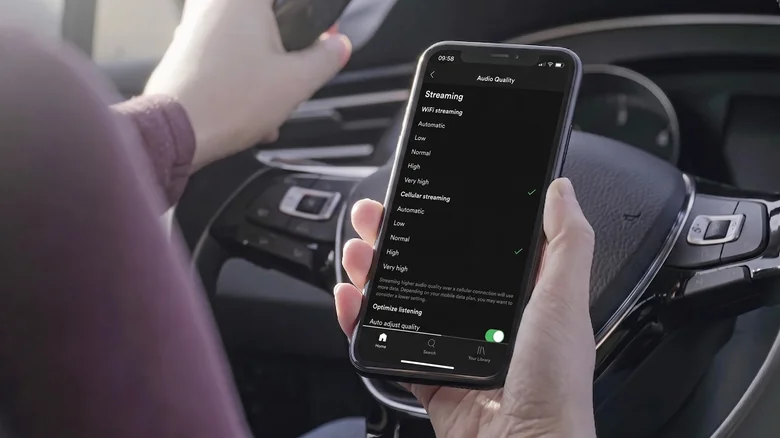
    Person adjusting the Audio Quality setting in the Spotify app on iPhone.

    If your music app switches quality depending on the network, a weak cellular connection can result in poor streaming quality, and pre-downloading your favorite playlists or albums can be one of the easiest ways to eliminate this factor. Spotify’s Automatic setting adjusts the streaming quality according to the connection, while YouTube Music gives Premium subscribers the ability to set a separate streaming quality level for downloads. That’s worth doing if you frequently pass through areas where five bars drop to one with little notice.

    Next, choose a higher download-quality setting, but don’t necessarily set all the numbers to the highest. Android supports playback sample rates up to 192kHz, but Google doesn’t provide a universal Android Auto output rate to confirm that your car is getting 192kHz audio. Bigger numbers here don’t necessarily help.

    You should pay more attention to your EQ and normalization settings. An earbuds-oriented profile with a bass boost can sound pretty weird in a car’s completely different speaker configuration, especially if the car is adding its own bass boost, surround processing or EQ. Spotify is a great example (and sometimes an annoying one): On Android phones with a built-in equalizer, changes made through Spotify can also affect the sound of other apps.

    Spotify’s Loud normalization setting also applies a limiter, so temporarily flatten the EQ, set normalization to Normal or turn it off and play a familiar downloaded track. Add your preferred adjustments back one at a time. It’s simple troubleshooting, but it’s better than changing six things and finding nothing.

    Use wired and wireless connections to narrow it down
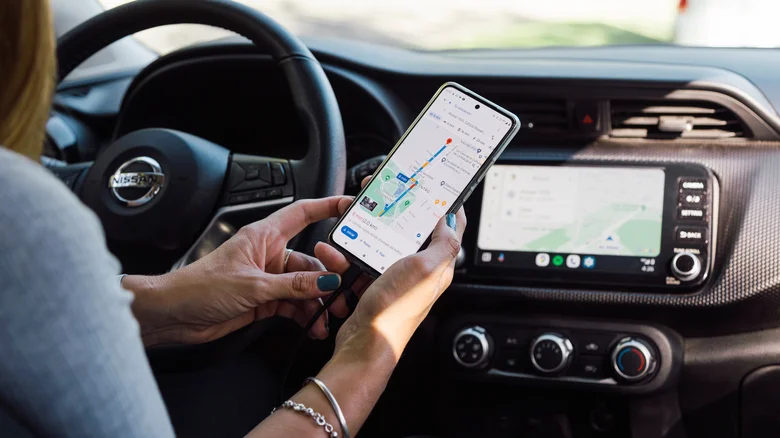
    A woman using Android Auto via USB on the car's infotainment system.

    Wireless Android Auto uses both Bluetooth and Wi-Fi, rather than simply sending music over a standard Bluetooth connection. The initial wireless setup pairs the phone and car over Bluetooth, with Wi-Fi also required for the connection. That makes going into Android’s developer options to search for aptX, LDAC or some supposedly better Bluetooth codec a bad place to begin.

    If playback is choppy, playback stalls or sounds obviously wrong, try the same downloaded song over wired Android Auto. If it sounds good, then you’ve isolated the connection without touching the music itself.

    If wired playback fails as well, then the cable is finally a suspect. Always use a known, good cable and never use a hub or extension. What you don’t need is a cable that you purchased simply because the packaging says it supports transfer speeds that your music will never even come close to using.

    The last place to check is the vehicle itself. Turn off bass boost, surround mode or other enhancements, flatten its EQ and compare the same track again. There is no consistent menu path because each infotainment system handles these controls differently (some seem to hide them for sport). If the problem persists, it may also be worthwhile to check whether a firmware update is available for an aftermarket receiver. Wireless Android Auto does require a compatible phone with 5GHz Wi-Fi support.

    Audio EVs and Transportation Google Improve Your
    Follow on Google News Follow on Flipboard
    Share. Facebook Twitter Pinterest LinkedIn Tumblr Email Copy Link
    myappsplus
    • Website

    Related Posts

    How to adjust the Liquid Glass effect on your iPhone with iOS 27

    September 13, 2026

    I was ready to call these the best open earbuds ever, and they’re incredibly cheap — but one recurring issue ruined it all

    September 13, 2026

    What’s behind the AI industry’s latest warnings of doom?

    September 13, 2026
    Add A Comment
    Leave A Reply Cancel Reply

    Top Posts

    The 6 AI-free Linux distros I recommend most

    August 19, 20264 Views

    AI, automation, robot dogs ensure on-site nuclear safety

    September 7, 20262 Views

    This tiny AI box could save me from upgrading my perfectly good laptop

    September 6, 20262 Views
    Latest Reviews

    Why Fluper is the No.1 Mobile App Development Company in the UAE, Saudi Arabia, and the Middle East.

    myappsplusAugust 18, 2026

    How New Kuwait And Indonesia Tech Deals At Baker Hughes (BKR) Have Changed Its Investment Story

    myappsplusAugust 18, 2026

    Google is reportedly planning to move all Pixel production out of China

    myappsplusAugust 18, 2026
    Stay In Touch
    • Facebook
    • YouTube
    • TikTok
    • WhatsApp
    • Twitter
    • Instagram

    Subscribe to Updates

    Get the latest tech news from FooBar about tech, design and biz.

    Most Popular

    Why Fluper is the No.1 Mobile App Development Company in the UAE, Saudi Arabia, and the Middle East.

    August 18, 20260 Views

    How New Kuwait And Indonesia Tech Deals At Baker Hughes (BKR) Have Changed Its Investment Story

    August 18, 20260 Views

    Google is reportedly planning to move all Pixel production out of China

    August 18, 20260 Views
    Our Picks

    iOS 27 Release Date: What Apple Confirmed for September 14

    September 13, 2026

    3 Netflix movies to watch if you loved ‘Why Did I Get Married Again?’ (and no, they’re not ALL Tyler Perry movies)

    September 13, 2026

    Parents face extra bus fees over smartphone stance

    September 13, 2026

    Subscribe to Updates

    Subscribe to our newsletter and get the latest tech news, app updates, AI trends, smartphone reviews, and exclusive deals delivered straight to your inbox.

    Facebook X (Twitter) Instagram Pinterest
    • About Us
    • Get In Touch
    • Disclaimer
    • Privacy Policy
    • Terms & Conditions
    © 2026 MyAppsPlus. All Rights Reserved.

    Type above and press Enter to search. Press Esc to cancel.